

If you've been researching email marketing tools, Brevo keeps coming up. It's in every "best email tools" list, every comparison article, and it's the platform people on Reddit keep recommending to anyone looking for a Mailchimp alternative. So the obvious question is: is it actually good, or just good marketing?
We did thorough research for this review. We analyzed every plan and feature, compared pricing against the top alternatives, went through hundreds of real user reviews on G2, Capterra, Trustpilot, and Reddit, and tested the platform ourselves. This article covers everything we found, so you can decide whether Brevo is the right fit for your business.
Try Brevo NowWhat is Brevo, and what happened to Sendinblue?
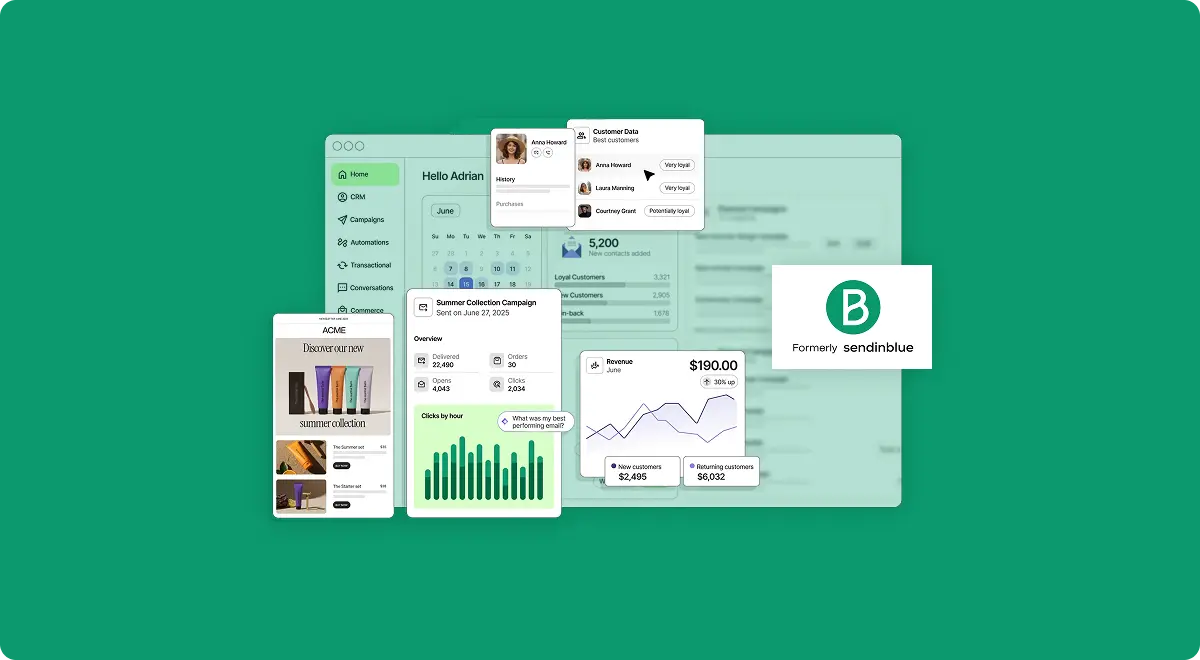
Brevo is an all in one marketing and CRM platform that handles email campaigns, SMS, WhatsApp, live chat, chatbots, and even phone calls. If you're thinking "wait, isn't that Sendinblue?" then yes, it is. The company rebranded from Sendinblue to Brevo in May 2023 to reflect the fact that they'd grown way beyond just email.
The platform launched back in 2012 in Paris, and it's grown to over 600,000 customers worldwide. Companies like Volkswagen, GoNoodle, and Dynato use it. The core idea has always been the same: give small and mid sized businesses professional marketing tools without the enterprise price tag.
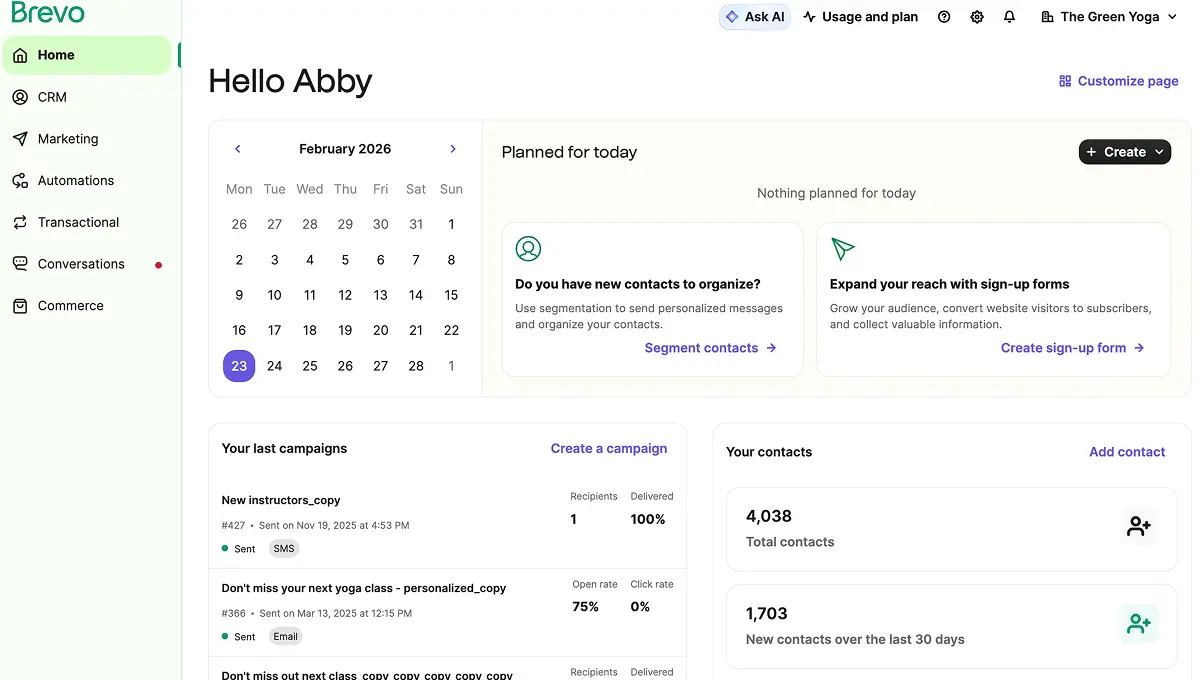
What makes Brevo different from most email marketing tools is the pricing model. While platforms like Mailchimp and Kit (formerly ConvertKit) charge you based on how many contacts you have, Brevo charges based on how many emails you send. That's a big deal if you have a large contact list but don't email them every single day. You can store up to 100,000 contacts for free and only pay when you need to send more.
The other thing worth knowing is that Brevo includes transactional emails on every plan, including the free one. Order confirmations, password resets, shipping updates, all of that is built in. Most competitors charge extra for transactional emails or don't offer them at all. If you run an online store, that alone can save you a separate subscription.
Who is Brevo built for?
Brevo works best for small to mid sized businesses that need email marketing, basic CRM, and automation without paying hundreds per month. If you're a solopreneur launching your first newsletter, a small ecommerce store sending order updates, or a growing business that needs to coordinate email, SMS, and WhatsApp campaigns from one place, Brevo is built for you.
Freelancers, agencies, and consultants get real value from the free CRM that comes with every plan. You get 50 open deals, 1 sales pipeline, live chat, and meeting scheduling at no cost. Most competing platforms either don't include CRM features or charge a separate fee for them.
For ecommerce specifically, Brevo integrates with Shopify, WooCommerce, and Magento. You can set up abandoned cart emails, product recommendation flows, and transactional notifications without needing a separate tool. It's not as specialized as Klaviyo or Omnisend for large ecommerce operations, but for small to mid sized stores, it covers everything you'd need.
On the other hand, if you're a large enterprise managing millions of contacts with complex customer journeys across 10+ channels, or if you need deep analytics with attribution modeling, you'll probably need a more specialized platform like HubSpot or ActiveCampaign. Brevo's strength is doing a lot of things well at a fair price, not being the absolute deepest tool in any single category.
The features that actually matter
Brevo has a lot of features. Too many to list here. But these are the ones that actually make a difference in your day to day use.
Email campaigns and the editor
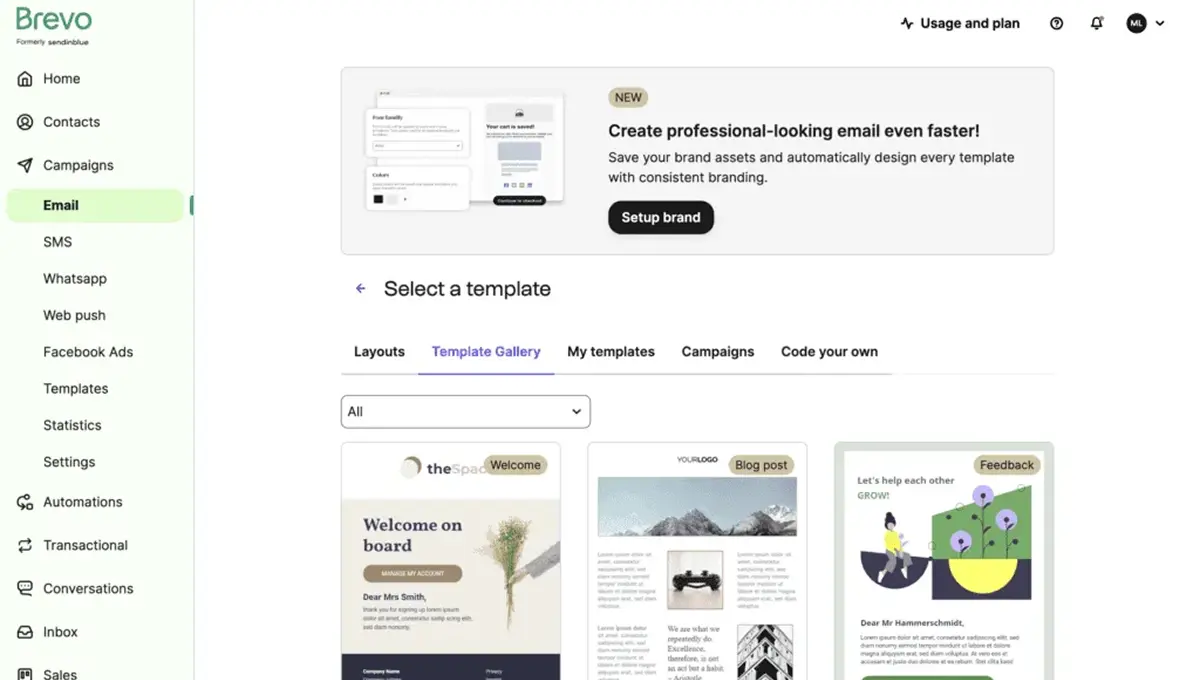
The drag and drop email editor is clean and easy to use. You get 40+ pre built templates, a brand library that applies your colors and fonts across all emails, and an AI content generator that can help with subject lines and body copy. The editor handles responsive design automatically, so your emails look good on mobile without extra work. It's not the most advanced editor out there, but it gets the job done without frustration.
Marketing automation
This is where Brevo punches above its weight class. You can build multi step workflows with if/else conditions, time delays, and triggers based on contact behavior. Welcome series, abandoned cart sequences, re engagement campaigns, birthday emails, all of it. The visual workflow builder is intuitive and you don't need any coding knowledge. On the free plan, automations are limited to 2,000 contacts. The Standard plan at $18/month removes that limit entirely.
Free CRM and sales tools
Every Brevo account includes a basic sales CRM at no extra cost. You get 50 open deals, 1 sales pipeline, live chat for your website, and an online meeting scheduler. It's not Salesforce, but for a small team tracking leads and deals, it's genuinely useful. If you need more, the Sales Essentials package adds unlimited deals, sales automation, and forecasting for $27.92/month.
SMS and WhatsApp campaigns
Brevo lets you send SMS messages to over 100 countries using pay as you go credits. WhatsApp campaigns are available on Professional and Enterprise plans. The powerful part is combining these with email in the same automation workflow. You could trigger an email, wait 2 days, and if the contact hasn't opened it, automatically send an SMS instead. That kind of multichannel flow usually requires more expensive tools.
Transactional emails
Order confirmations, password resets, account activations, shipping notifications. Brevo handles all of these through its SMTP relay and API. You get real time tracking, dedicated IP options on higher plans, and no extra fees. For context, Mailchimp charges this as a paid add on, and many competitors don't offer transactional email at all. If your business sends any kind of automated transactional messages, Brevo having this built in is a genuine advantage.
Want to see all these features yourself? Brevo's free plan lets you try email campaigns, automation, CRM, and transactional emails with no credit card required.
Try Brevo. It's FREE!Brevo pricing in 2026: what you'll actually pay
Brevo has four paid plans plus a free tier. The pricing is based on how many emails you send per month, not how many contacts you store. That's the single biggest difference between Brevo and most competitors.
The Free plan includes 300 emails per day (roughly 9,000/month), up to 100,000 contacts, drag and drop editor, 40+ templates, marketing automation for up to 2,000 contacts, basic reporting, forms, the AI content generator (Aura AI), advanced segmentation, and the sales CRM with 50 deals and live chat. No credit card required. The catch? You get a Brevo logo on every email, and the daily sending cap means you can't blast your entire list at once.
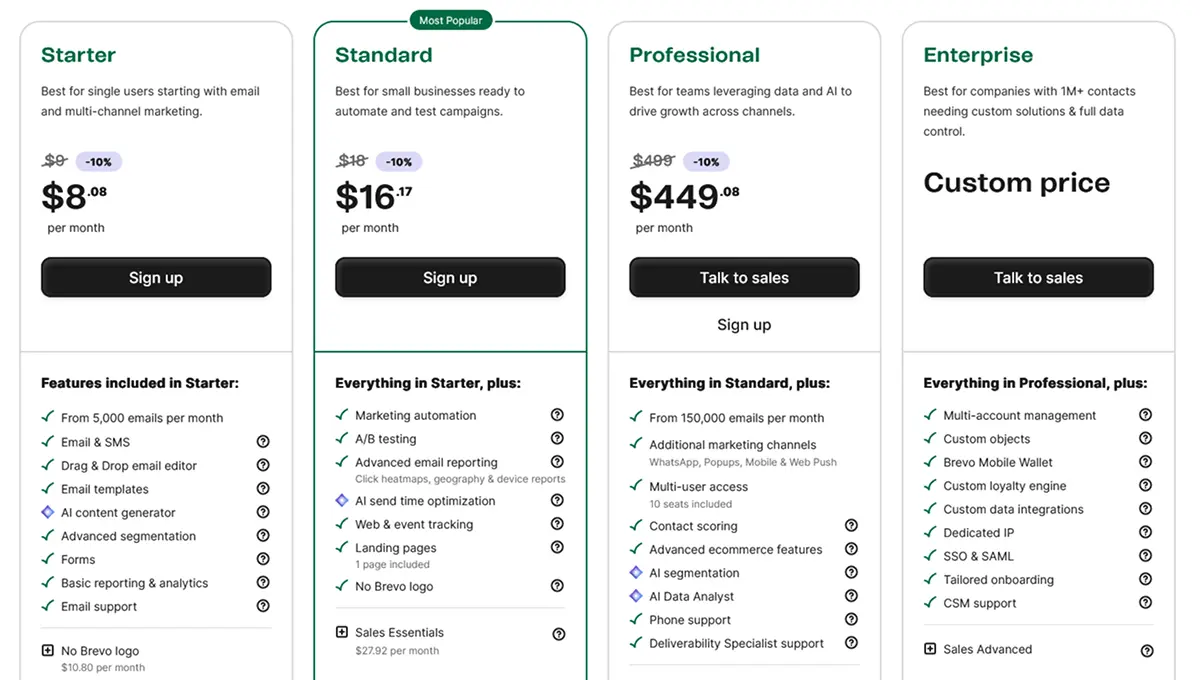
The Starter plan at $9/month (or $8.08/month billed yearly) removes the daily sending limit and gives you 5,000 emails per month with 500 contacts storage. You also get email and SMS campaigns, web push notifications, forms, and email support. To remove the Brevo logo on Starter, it's an extra $10.80/month. Automation is still capped at 2,000 contacts on this plan.
The Standard plan at $18/month (or $16.17/month yearly) is where things open up. You get everything in Starter plus marketing automation with no contact limit, A/B testing, advanced email reporting with click heatmaps and device reports, AI send time optimization, web and event tracking, and 1 landing page. The Brevo logo is removed by default. This is the plan most growing businesses will want.
The Professional plan starts at $499/month (or $449.08/month yearly) and is built for larger teams. You get 150,000+ emails per month, WhatsApp and web push campaigns, multi user access with 10 seats included, contact scoring, AI segmentation, an AI Data Analyst, phone support, and a deliverability specialist. The Sales Advanced package is available as an add on at $58.50/month per user.
The Enterprise plan is custom priced for companies with 1M+ contacts. You get multi account management, custom loyalty engine, dedicated IP, SSO and SAML, tailored onboarding, and CSM support.
One thing that catches people off guard: the Starter plan now has contact limits tied to your email volume tier. At the 5,000 emails/month level, you're limited to 500 contacts. At 20,000 to 100,000 emails/month, you can store up to 500,000 contacts. The free plan is actually more generous for contact storage at 100,000. Keep that in mind when comparing plans.
"Brevo gives me all the tools I need to stay connected with my audience in one place, without spending hours learning how to use them."
— Paul Lacitinola, Owner, Vintage Camper TrailersThe free plan: what you get and where it stops
Brevo's free plan deserves its own section because it's one of the most generous free tiers in email marketing. Let's break down exactly what you get and where the limitations start to bite.
What you actually get for $0: 300 emails per day, 100,000 contact storage, the full drag and drop editor, 40+ email templates, marketing automation workflows (up to 2,000 contacts), advanced segmentation, transactional emails via SMTP and API, a basic sales CRM with 50 deals, live chat widget, meeting scheduler, forms, and the Aura AI content assistant.
To put that in perspective, Mailchimp's free plan limits you to 250 contacts and only lets you set up basic single step automations. Kit's (ConvertKit) free plan gives you 1,000 subscribers but no automation at all. Brevo gives you 100,000 contacts and multi step automation for free. That's a massive difference.
Where it stops working: The 300 emails per day cap is the real bottleneck. If you have 1,000 subscribers and want to send a newsletter, it'll take over 3 days to reach everyone. Time sensitive promotions become impossible. You also can't remove the Brevo branding, there's no A/B testing, no landing pages, and no advanced reporting (you won't see who clicked what). Support is email only with potentially slow response times.
The free plan is perfect for testing the platform, building your list, and sending to a small audience. Once you consistently need to email more than 300 people per day, or you want A/B testing and clean unbranded emails, it's time to upgrade. The jump to Starter at $9/month is one of the cheapest upgrades in the industry.
What real users are saying about Brevo
We went through hundreds of reviews across G2, Capterra, Trustpilot, and Reddit to see what the actual user experience looks like.
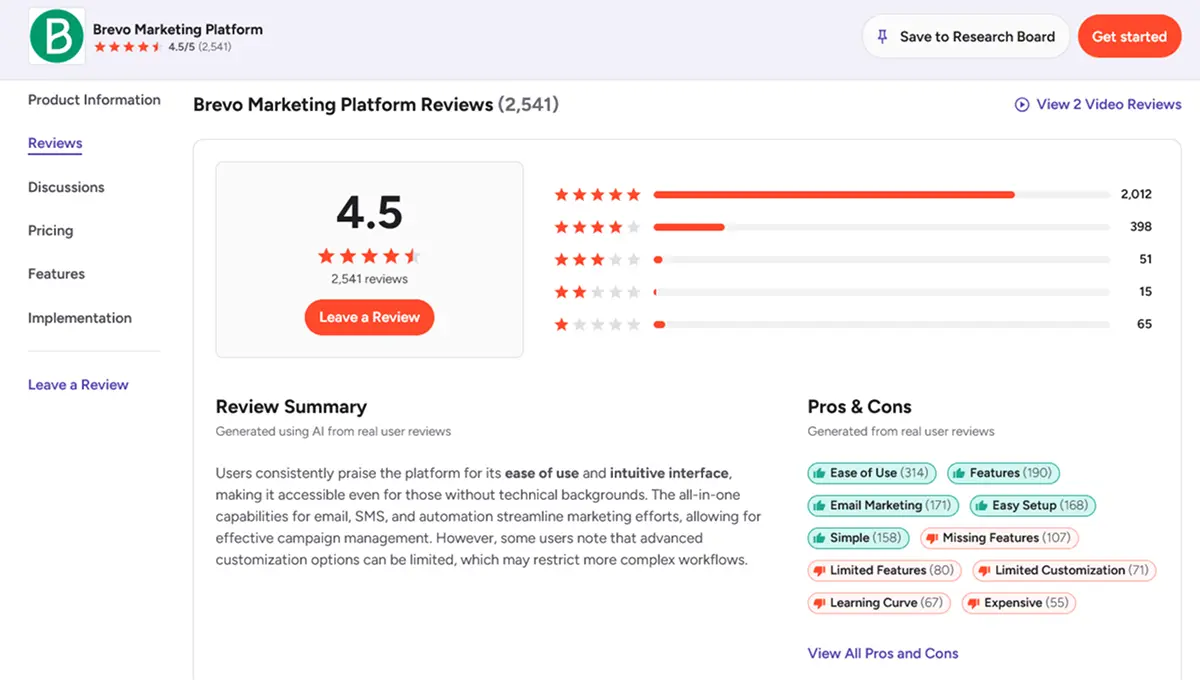
Brevo holds a 4.5 out of 5 rating on major review platforms. The most praised aspect is the value for money. Users consistently mention that they're getting features that would cost 3 to 5 times more on competing platforms. The free plan's generosity comes up constantly, especially the unlimited contact storage and built in automation.
On Reddit's r/Emailmarketing and r/Brevo communities, the sentiment is generally positive. Users highlight that Brevo's automation workflows are surprisingly capable for the price, and the free plan's ability to handle multi step sequences puts it ahead of most competitors. One common Reddit observation is that Brevo is easier and cheaper than Mailchimp, while Mailchimp has a more polished interface.
The most common complaints are about the email template library being smaller than competitors like Mailchimp (40+ templates versus Mailchimp's 100+), occasional deliverability issues on shared IP addresses with the free plan, and customer support being slow on lower tier plans. Some users also mention that the landing page builder feels basic compared to dedicated landing page tools.
One pattern worth noting: users who previously used Mailchimp and switched to Brevo almost always mention the cost savings. Several reviews specifically call out that they're paying a fraction of what they were paying before for the same or better functionality.
Honest pros and cons breakdown
What we like
What could be better
Who should use Brevo (and who shouldn't)
Brevo is a strong fit if you need email marketing on a tight budget, have a large contact list but don't email frequently, want transactional and marketing emails from the same platform, run a small ecommerce store on Shopify or WooCommerce, need a basic CRM without paying for a separate tool, or want to combine email with SMS and WhatsApp in one workflow.
You might prefer a different tool if you need an extensive template library and visual polish above all else (Mailchimp), run complex ecommerce operations with deep product recommendation engines (Klaviyo or Omnisend), need advanced automation with deep CRM integration (ActiveCampaign), or if you send emails daily to large lists and need predictable contact based pricing.
"Brevo's campaign builder is very straightforward. I can create professional emails in minutes."
— Paul Lacitinola, Owner, Vintage Camper TrailersHow Brevo stacks up against the competition
There are several strong email marketing platforms in 2026. Here's how Brevo compares to the most popular options.
Brevo vs Mailchimp: This is the comparison most people are looking for. Brevo wins on pricing by a significant margin. On the free plan, Brevo gives you 100,000 contacts versus Mailchimp's 250. On paid plans, Brevo can be up to 9 times cheaper for the same email volume. Mailchimp wins on template variety, brand recognition, and a slightly more polished interface. If budget is a factor, Brevo is the clear winner.
Brevo vs Kit (ConvertKit): Kit is built for creators, bloggers, and course sellers. It has a simpler, cleaner interface and stronger tools for selling digital products. Brevo is broader with more channels (SMS, WhatsApp, live chat) and significantly cheaper on paid plans. Kit's free plan gives you 1,000 subscribers but no automation. Brevo's free plan includes automation for 2,000 contacts. Choose Kit if you're a pure content creator. Choose Brevo if you need multichannel marketing. We have a detailed Kit vs Brevo comparison that breaks down every difference.
Brevo vs ActiveCampaign: ActiveCampaign is the automation powerhouse. If you need deeply complex workflows with dozens of conditions, tags, and scoring rules, ActiveCampaign is better. But it starts at $15/month with no free plan. Brevo's automation is simpler but covers what most small businesses actually need, at a lower cost with a generous free tier.
Brevo vs Mailerlite: MailerLite is another budget friendly option with a clean editor and generous free plan (1,000 subscribers, 12,000 emails/month). Brevo's advantage is multichannel capabilities and transactional emails. MailerLite's advantage is a better free plan sending limit and included landing pages on the free tier. Both are solid choices for budget conscious businesses.
How to get started without the overwhelm
Brevo is simpler to set up than most marketing platforms, but here's a practical approach to get running quickly.
Start by signing up for the free plan. No credit card needed. You'll go through a quick account approval process where Brevo verifies your business. This usually takes a few hours. They do this to protect deliverability for all users, which is actually a good sign.
Once approved, import your contacts first. You can upload a CSV, sync from another platform, or add contacts manually. Set up at least one list and create a few segments based on your business needs (for example, "newsletter subscribers" and "customers").
Next, go to the email editor and create your first campaign. Pick a template, customize it with your brand colors and logo using the Brand Library feature, and send yourself a test. Don't overthink the first email. Get something out the door and iterate from there.
If you're coming from Mailchimp, Brevo has a built in migration tool that syncs your contacts automatically. You don't need to manually export and reimport. The transition takes minutes, not hours.
Once you've sent a few campaigns, explore the automation section. Start with a simple welcome email sequence for new subscribers. It's 3 steps: trigger (new contact added), delay (1 day), action (send welcome email). From there, you can add more steps as you learn what your audience responds to.
"The Brevo platform is more user friendly and its free plan gives you more room to test things. With Mailchimp's free plan, you cannot even set up an automated welcome email."
— Brevo user, G2 ReviewFrequently asked questions
Yes, Brevo has a Free Forever plan with no credit card required. You get 300 emails per day (roughly 9,000 per month), storage for up to 100,000 contacts, a drag and drop editor, 40+ templates, marketing automation for up to 2,000 contacts, and a basic sales CRM. The main limitations are the daily sending cap and Brevo branding on your emails.
Brevo's Starter plan begins at $9/month for 5,000 emails. The Standard plan starts at $18/month and adds A/B testing, landing pages, and unlimited automation contacts. The Professional plan starts at $499/month for teams that need 150,000+ emails and advanced features. Annual billing saves you 10% on all plans, bringing Starter down to $8.08/month and Standard to $16.17/month.
Brevo is one of the best email marketing platforms for small businesses on a budget. It charges based on emails sent rather than contacts stored, which keeps costs predictable. The free plan alone covers the basics for most early stage businesses. Once you outgrow it, Starter at $9/month is one of the cheapest paid options available. The included CRM and multichannel features mean you don't need to pay for separate tools.
For small businesses watching their budget, Brevo offers significantly better value. Brevo's free plan includes 100,000 contacts and automation workflows, while Mailchimp's free plan caps you at 250 contacts with only basic single step automation. On paid plans, Brevo can cost up to 9 times less than Mailchimp for the same email volume. Mailchimp has a more polished interface and stronger template library, but you pay considerably more for those extras.
Sendinblue rebranded to Brevo in May 2023. Same company, same platform, same team. The rebrand reflected the company's expansion beyond email into CRM, SMS, WhatsApp, live chat, and other channels. If you had a Sendinblue account, it carried over to Brevo automatically with all your data intact. Some people still search for "Sendinblue review" but it's the same product under a new name.
Yes, and this is one of Brevo's biggest advantages. Transactional emails like order confirmations, password resets, and shipping notifications are included on all plans at no extra cost. Brevo provides SMTP relay, RESTful APIs, and webhooks for integration. Most competitors either charge separately for transactional emails or don't offer them at all.
Final verdict: is Brevo worth it in 2026?
Yes, Brevo is a genuinely solid platform. It's not the best at any single thing, but it's good at almost everything, and the pricing makes it hard to beat for small to mid sized businesses.
The platform's biggest strength is the combination of features and affordability. You're getting email campaigns, SMS, WhatsApp, automation, a CRM, transactional emails, live chat, and forms from one platform. Trying to get all of that from separate tools would cost 3 to 5 times more per month. And the fact that you can store 100,000 contacts on the free plan while competitors cap you at a few hundred is a genuinely unfair advantage.
The biggest weaknesses are real but manageable. The template library is smaller than Mailchimp's. The landing page builder is basic. The free plan's 300 emails/day cap means you'll outgrow it eventually. And the Starter plan charging extra to remove branding feels unnecessary. None of these are dealbreakers, but they're worth knowing about upfront.
If you've been thinking about trying it, the free plan is the easiest way to start. Sign up, import your contacts, send a campaign, and test the automation builder. You'll know within a few days whether Brevo fits how you work. And if it does, the upgrade path from free to Starter to Standard is one of the most affordable progressions in email marketing.
Ready to see if Brevo fits your business? The free plan includes 300 emails/day, 100,000 contacts, automation, and CRM. No credit card needed.
Try Brevo Now