

Your hosting bill just tripled at renewal. Your WordPress site got hacked and support took 18 hours to respond. You're paying extra for features that every other host throws in for free. If you're researching DreamHost because your current host let you down, you're not alone, and DreamHost's 97-day money-back guarantee is the loudest answer to that exact pain. The question is whether the promise holds up in 2026, or whether it's just another budget host with a bigger return window.
This review cuts through the marketing and breaks down what DreamHost really gets right, where it falls short, and whether it earns your $2.89/month in 2026.
Try DreamHost NowWhat is DreamHost and what do they actually do?
DreamHost was founded by four Harvey Mudd College students in 1996, which actually predates Google. That's a genuinely rare feat in the hosting world. Today they host over 1.5 million websites for 400,000+ customers across 100+ countries, and they're one of only three hosts officially recommended by WordPress.org (alongside Bluehost and SiteGround).
The company's product lineup covers shared hosting, managed WordPress (DreamPress), VPS, dedicated servers, cloud hosting, domain registration, and professional email. In 2026 they added the Remixer AI website builder and Bunny CDN integration, both included free on the hosting plans. The dashboard is a custom-built control panel rather than cPanel, which simplifies things for beginners but takes adjustment if you're coming from cPanel hosts.
The two things DreamHost is genuinely known for are the 97-day money-back guarantee (triple the industry standard 30 days) and the 100% uptime guarantee. Neither is a marketing trick. The refund window is enforced, and the uptime SLA actually pays you back in credits if they miss it.
Who is DreamHost built for?
DreamHost works best for beginners, small business owners, WordPress bloggers, and anyone who got burned by renewal pricing from another host. The transparent pricing (no upsells forced at checkout) and the 97-day refund window make it one of the lowest-risk ways to launch a first website.
WordPress users get real value from DreamPress, the managed WordPress product at $16.95/month with automatic updates, daily backups, Bunny CDN, and free WordPress migration. It's also built on Google Cloud infrastructure with isolated resources, which is a meaningful step up from standard shared hosting. If you need premium WordPress performance, our Kinsta review covers the higher-end option at $35/month and up.
On the other hand, DreamHost is probably not right for high-traffic ecommerce stores, agencies managing 20+ client sites, or developers who need cPanel. The custom control panel, while user-friendly, lacks some cPanel-native integrations. Shared hosting performance is solid but nothing special, and the renewal pricing becomes a real concern once your intro term ends.
For starter sites on a tighter budget, our Namecheap review covers an even cheaper option at $1.98/month. For faster LiteSpeed-based hosting, our Hosting.com review walks through that alternative.
DreamHost pros: what actually works in 2026
Let's start the DreamHost pros and cons breakdown with what DreamHost genuinely gets right. These aren't marketing claims, they're things real customers consistently praise in Trustpilot and Reddit reviews.
97-day money-back guarantee (industry-leading)
This is the single most generous refund window in hosting. Most competitors offer 30 days. Bluehost, Hostinger, SiteGround all stop there. DreamHost gives you 97 days on shared hosting plans, which is effectively a 3-month free trial after the fact. You can launch your site, run it for 90 days with real traffic, and still get a full refund if you're not happy.
100% uptime guarantee with actual credits
DreamHost promises 100% uptime and backs it with service credits if they miss. You get 10% of your monthly hosting fee refunded for each hour of downtime beyond the first, up to a full month's credit. Most hosts promise 99.9% uptime (8 hours of allowed downtime per year) and don't refund when they break it.
Free domain + free privacy for life
Every annual plan includes a free .com domain for the first year, and domain privacy is free for life on all registrations. Most competitors charge $12-15/year for privacy alone. Over 5 years, that's $60-75 saved just on privacy protection.
WordPress.org officially recommended
WordPress.org lists only three hosts on its official recommendations page: Bluehost, SiteGround, and DreamHost. The WordPress core team tests these hosts directly, and the list rarely changes. It's a meaningful vote of confidence that your host won't break when WordPress pushes a core update.
Remixer AI builder + Bunny CDN (new in 2026)
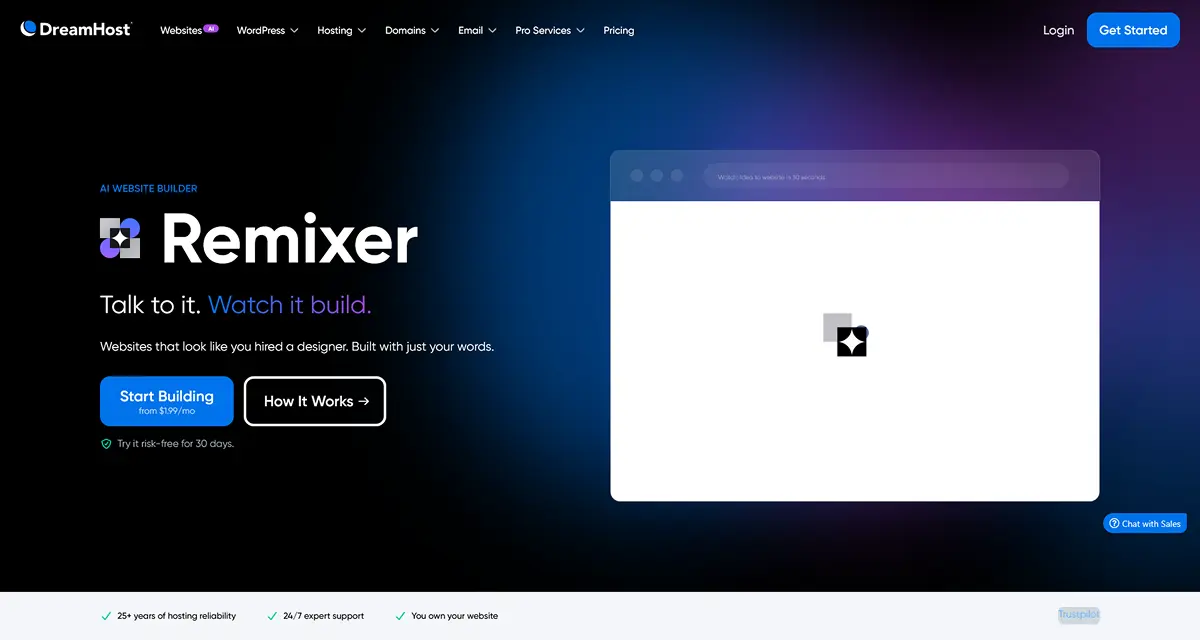
DreamHost added two serious features in 2026. The Remixer AI builder generates a professional WordPress site in about 60 seconds (answer a few questions, the AI handles design, content, and layout). The Bunny CDN integration delivers low-latency global content on every plan, even the $2.89/month Launch tier. Both are included free. That's more value than most competitors bundle.
Unmetered bandwidth on every plan
All DreamHost plans include unmetered bandwidth, from Launch up to Dedicated Servers. No overage fees, no throttling on traffic bursts. If your post goes viral, you don't come back to a $400 surprise bill.
Want to test DreamHost without any risk? The 97-day money-back guarantee means you can sign up, launch your site, run it for 3 months with real traffic, and still get a full refund if it's not the right fit. That's longer than any free trial the industry offers.
Get startedDreamHost cons: the honest trade-offs
No complete review of DreamHost pros and cons is fair without the weaknesses. Here's what real customers flag most often and what you should know before signing up.
Renewal prices jump 150 to 280 percent
This is the single biggest DreamHost complaint across all reviews. The Launch plan goes from $2.89 to $10.99/month at renewal (280% increase). Growth goes from $3.99 to $13.99/month (250%). Scale goes from $9.99 to $25.99/month (160%). DreamPress is gentler at 33-39%, and dedicated servers have no renewal hike at all. Smart buyers lock in a 3-year plan upfront to delay the jump.
No free phone support on base plans
Phone support is not included on shared, DreamPress, or VPS base plans. You get 24/7 live chat and email, but phone support costs $14.95/month extra or requires upgrading to higher DreamPress tiers. Competitors like Bluehost include phone on entry plans. For technical emergencies, this matters.
Shared hosting migration isn't free
DreamHost includes free migration only on DreamPress plans. Shared hosting migration is a paid service. Workaround: the 97-day refund window gives you room to self-migrate using plugins without losing money if things don't work out.
Custom control panel (not cPanel)
DreamHost uses its own custom control panel rather than cPanel. For beginners this is actually easier, but if you're used to cPanel workflows, email setup, database management, and file management all feel slightly different. The dashboard also upsells paid services on most screens (website builder, email add-ons, SEO toolkit). It's not aggressive, but it's present.
No server locations outside the US
DreamHost's shared and DreamPress data centers are all in the United States. Cloud Hosting offers more flexibility, but for shared customers with primarily European or Asian audiences, latency isn't ideal. The Bunny CDN integration helps with static content, but origin server latency still hits non-US visitors first.
DreamHost pricing in 2026: what you'll actually pay
DreamHost's pricing is tiered by websites, storage, and monthly visits. Here's what each plan actually costs in 2026 and which one you'll probably end up on.
The smart move for most people is to take advantage of the 97-day money-back guarantee, which works as a 3-month paid trial with full refund eligibility. You pay upfront, launch your site, and if anything doesn't work out, you get every dollar back.
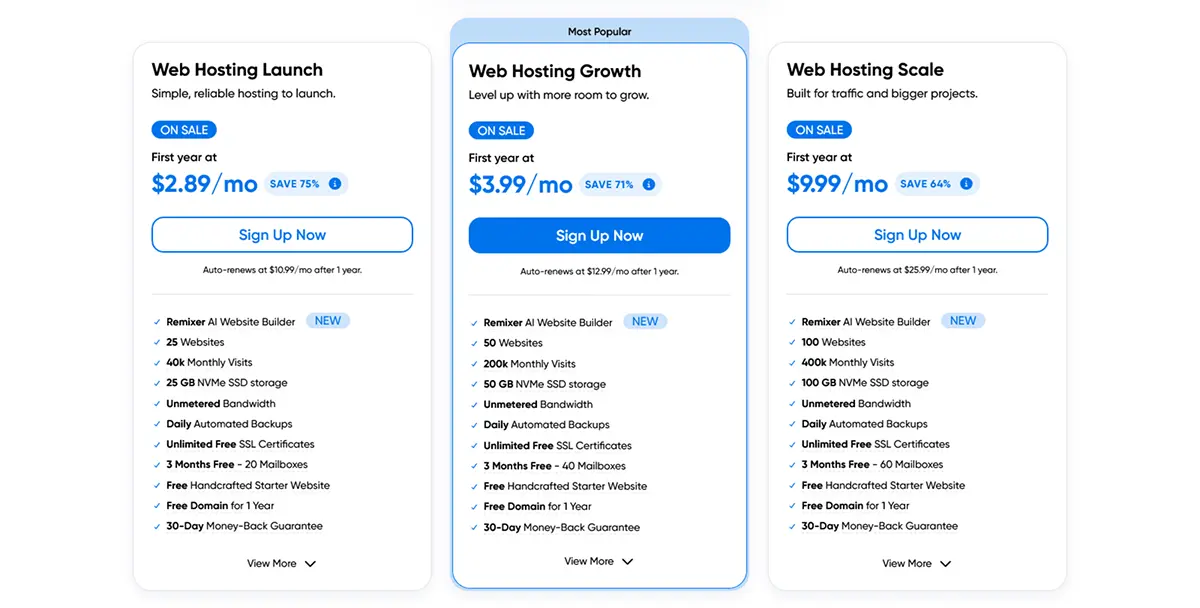
Once you're picking a plan, here's the honest breakdown. The Web Hosting Launch plan at $2.89/month (renews $10.99/month) is the entry point: 25 websites, 25GB NVMe SSD, unmetered bandwidth, free domain, free SSL, Remixer AI builder, and Bunny CDN. Fine for a blog or portfolio under 100,000 monthly visits.
The Web Hosting Growth plan at $3.99/month (renews $13.99/month, marked "Most Popular") is where most serious users land. 50 websites, 50GB SSD, 200,000 monthly visits, unlimited free SSL certificates, and 3 months of free Pro Email. For the extra $1.10/month over Launch, you double your traffic ceiling and get professional email thrown in. If you're running a business site, this is the smart buy.
The Web Hosting Scale plan at $9.99/month (renews $25.99/month) covers 100 websites, 100GB SSD, and 400,000 monthly visits. Beyond shared, DreamPress managed WordPress starts at $16.95/month and renews at a much gentler $19.99/month (only 33-39% hike). VPS hosting from $10/month, Cloud Hosting from $4.50/month, and dedicated servers from $165/month (no renewal hike at all).
One thing to watch: renewal pricing is the single biggest DreamHost gotcha. The 150-280% renewal jump on shared hosting is steep. Lock in a 3-year term at the intro rate to delay the hike, or use the 97-day window to migrate if the math stops working.
"I have hosted with Dreamhost for just over 20 years and worked with several hosting companies since. I have always been really grateful for such immediate help whether it's by chat which I use most."
— Mary, Trustpilot reviewerDreamPress: the managed WordPress story
DreamPress deserves its own section because it's a meaningfully different product from shared hosting. It's managed WordPress hosting on Google Cloud infrastructure with isolated resources, automatic updates, daily backups, staging environments, Bunny CDN, and free WordPress migration by DreamHost's team.
The entry tier starts at $16.95/month (renews at $19.99/month, only a 33% hike which is dramatically better than shared hosting). It handles up to 100,000 monthly visits with 30GB SSD. The Plus tier at $24.95/month covers 300k visits and 60GB SSD. DreamPress Pro at $71.95/month handles 1 million monthly visits with 120GB SSD.
The real value of DreamPress is the isolation. Unlike shared hosting where your site shares CPU with hundreds of others, DreamPress gives each site its own container on Google Cloud. Performance stays consistent under traffic spikes, and the managed stack handles PHP updates, plugin conflicts, and security patches automatically. For WordPress businesses, this is the upgrade that actually pays for itself in uptime and admin hours saved.
If you need even more enterprise-grade WordPress infrastructure with Cloudflare Enterprise and isolated containers across 37 global data centers, our Kinsta review covers that tier (starting at $35/month). For most small-to-mid WordPress sites, DreamPress gets the job done at less than half the price.
What real users are saying in 2026
We went through recent reviews on Trustpilot, G2, Reddit, and HostAdvice to see what actual DreamHost customers are saying in 2026.
The platform holds a strong Trustpilot rating with consistent 5-star reviews focused on support responsiveness and long-term reliability. Customers who've been with DreamHost for 5, 10, even 20+ years keep appearing in reviews, which is a meaningful signal. Hosting companies don't retain customers for decades unless something is genuinely working.
The most consistent praise goes to the live chat support team, long-term reliability, and the fairness of the 97-day refund policy. Customers report that support responds in under 30 minutes for chat tickets, and that agents actually fix issues rather than escalating through three tiers first.
One Trustpilot reviewer, Jim C., wrote that he changed a URL setting incorrectly and shut down his entire site, and DreamHost support responded within 20 minutes and spent over 45 minutes fixing it for him. Another reviewer, Victor Q, reported a 503 error across his site and said support was "very good" at resolving it on his side.
Common complaints are predictable. Renewal pricing dominates the critical reviews as expected. A small number of customers report slow server response times outside the US, which matches DreamHost's US-only data center footprint. These are real issues but they're knowns, not surprises.
Who should use DreamHost (and who shouldn't)
DreamHost is a strong choice if you're launching your first website, running a WordPress blog or small business site, you value the 97-day refund window over raw performance metrics, or you want honest pricing without upsell games at checkout. The 2-month free promo on annual plans plus free domain plus free SSL make it an easy entry.
Skip DreamHost if you're running a high-traffic ecommerce store above 500k monthly visits, you need data centers in Europe or Asia for local audiences, you want cPanel specifically, or you need phone support on the base plan. For high-performance managed WordPress, our Kinsta review covers the premium option. For budget alternatives, the Namecheap and Hosting.com reviews walk through other choices worth considering.
How DreamHost stacks up against the competition
DreamHost competes in the budget-to-mid hosting space. Here's how it compares against the hosts most people are also considering.
DreamHost vs Bluehost. Both are WordPress.org recommended. Bluehost includes phone support on entry plans, which DreamHost doesn't. DreamHost has the 97-day refund window (vs Bluehost's 30 days), and DreamHost renewal prices are generally lower than Bluehost's. For WordPress beginners on a budget, DreamHost edges ahead.
DreamHost vs SiteGround. SiteGround has 11 global data centers including EU and Asia, which DreamHost lacks. SiteGround's entry plan is $2.99/month but renews at $18/month (500%+ jump, much worse than DreamHost's 280%). For non-US audiences, SiteGround wins on latency. For refund flexibility and lower renewal shock, DreamHost wins.
DreamHost vs FastComet. Both are similar in pricing but FastComet has 11 global data centers (including non-US locations). For a full head-to-head, see our DreamHost vs FastComet comparison.
How to get started without the headaches
Signing up for DreamHost is straightforward, but a few things are worth knowing upfront.
Start by picking the right plan based on your actual traffic, not your ambition. A blog under 100k monthly visits fits fine on Launch at $2.89/month. If you're running a business site or expecting 100k+ visits, the Growth plan at $3.99/month is the smart buy. Scale at $9.99/month is for agencies with multiple client sites.
Next, commit to the longest term you're comfortable with. The intro rate only applies during your first term, so a 3-year plan locks in $2.89/month for 36 months. The 97-day money-back guarantee gives you a safety net during the first 97 days regardless of term.
At checkout, skip the paid add-ons unless you actually need them. Default checkout prompts include professional email, privacy protection (but this is actually free for life, so ignore the upsell), and SiteLock security. You can always add them later from the dashboard. One-click WordPress install takes about 30 seconds after signup. For DreamPress migrations, submit a ticket and DreamHost's human team handles it for free.
"I opened a support ticket and received a reply within about 35 minutes and the tech knew exactly what I had done wrong. As a part time web site builder, I often run into issues, and DreamHost's support has been consistently helpful."
— Skip Dyrda, Trustpilot reviewerFrequently asked questions
DreamHost's biggest pros are the 97-day money-back guarantee (triple the industry standard), WordPress.org's official recommendation, free domain for the first year, unmetered bandwidth on all plans, a 100% uptime guarantee, and the new Remixer AI website builder included free. The cons are real too. Renewal prices jump 150 to 338 percent after the first term, there's no phone support on base plans unless you pay $14.95/month extra, shared hosting migration isn't free (only DreamPress migrations are), and the custom control panel takes getting used to if you're coming from cPanel.
DreamHost's shared hosting starts at $2.89/month on the Launch plan (renews at $10.99/month), $3.99/month on the Growth plan (renews $13.99/month), and $9.99/month on the Scale plan (renews $25.99/month). DreamPress managed WordPress starts at $16.95/month and renews at $19.99/month, which is a much gentler renewal hike. VPS hosting starts at $10/month, Cloud Hosting at $4.50/month, and dedicated servers at $165/month. All shared plans include a 97-day money-back guarantee.
DreamHost is worth it for beginners, small business owners, and WordPress site owners who value transparent pricing and a generous money-back window. The 97-day guarantee is the longest in the industry and genuinely risk-free. DreamPress at $16.95/month is a solid managed WordPress product with a reasonable 33 to 39 percent renewal hike. For high-traffic ecommerce sites or agencies managing many client sites, premium hosts like Kinsta offer better infrastructure. For hobby sites and small businesses, DreamHost earns its place in 2026.
DreamHost is genuinely good for WordPress, and it's one of only three hosts officially recommended by WordPress.org (alongside Bluehost and SiteGround). The DreamPress plan includes automatic updates, daily backups, a built-in CDN via Bunny, free WordPress migration, staging environments, and expert WordPress support. The Remixer AI website builder is also available on all plans and can generate a WordPress starter site in minutes. For a small WordPress site under 100k monthly visits, DreamHost delivers solid performance at a fair price.
DreamHost's renewal prices jump significantly after the first term. The Launch plan goes from $2.89/month to $10.99/month (a 280 percent increase). The Growth plan goes from $3.99/month to $13.99/month (250 percent). The Scale plan goes from $9.99/month to $25.99/month (160 percent). DreamPress is more gentle at 33 to 39 percent, and dedicated servers have no renewal hike at all. The smart move is to lock in a 2 or 3 year plan upfront to delay the jump, or use the 97-day money-back window to test and migrate if needed.
DreamHost does not offer a traditional free trial, but the 97-day money-back guarantee is effectively a 3-month no-risk trial. You pay upfront, launch your site, and if you're not happy for any reason within 97 days, you get a full refund with no questions asked. That's triple the industry-standard 30-day window. Dedicated and VPS plans have shorter refund windows (30 days), so the 97 days applies to shared hosting specifically. Free domain privacy is also included for life, which is a real cost saving over the trial period.
Final verdict: is DreamHost worth it in 2026?
So, do DreamHost's pros and cons balance out in 2026? Yes, for the right use cases. Not as a one-size-fits-all answer, but as the safest pick for beginners, small business owners, and WordPress site owners who want a long runway to test before committing.
The biggest strengths are the 97-day money-back guarantee (genuinely risk-free), the 100% uptime SLA with real service credits (not marketing), and DreamPress managed WordPress (Google Cloud infrastructure at $16.95/month with a gentle 33% renewal hike).
The biggest weaknesses are real. Renewal pricing jumps 150-280% on shared hosting. No phone support on base plans unless you pay $14.95/month extra. No non-US data centers on shared, which hurts international audiences. And free migrations only on DreamPress, not on shared.
If you've been considering it, the 97-day money-back guarantee is the cleanest way to evaluate fit. Sign up, launch your site, run it for 3 months with real traffic. If performance holds up and pricing still works, stay. If not, get a full refund and move on. For most beginners and small business owners, DreamHost earns its spot in 2026.
DreamHost starts at $2.89/month with the longest money-back guarantee in hosting. If you're launching a new WordPress site, the Growth plan at $3.99/month unlocks 200,000 monthly visits, unlimited SSL certificates, 3 months of free Pro Email, plus Bunny CDN and the Remixer AI builder. Every plan includes the 97-day money-back guarantee, free domain for 1 year, and no setup fees.
Start with DreamHost