


In January 2025, World Host Group paid $2 million for the hosting.com domain. Three months later, they used it to rebrand A2 Hosting, a 22-year-old Michigan hosting company with 3 million websites on its servers. The question for anyone searching for A2 Hosting today is simple: is this new Hosting.com actually any good, or did the rebrand change something important about the product people loved?
This review covers what changed, what didn't, and whether Hosting.com deserves your money in 2026. Everything you need to decide without reading ten other reviews first.
Visit Hosting.comWhat happened to A2 Hosting?
Hosting.com is A2 Hosting with a new name and a fresh coat of paint. World Host Group acquired A2 Hosting in January 2025, paid a reported $2 million for the hosting.com domain, and officially flipped the brand in April 2025. Same team, same servers, same Ann Arbor, Michigan headquarters. If you had an A2 Hosting account, it moved over automatically with all your sites intact.
A2 Hosting was founded back in 2003 by Bryan Muthig, and it built its reputation on one thing: speed. While other budget hosts were racing to the bottom on price, A2 invested in LiteSpeed servers, NVMe SSDs, and AMD EPYC processors. The famous "Turbo" language that marketed their fastest plans came from that era. All of that performance DNA carried over to Hosting.com. You'll still see "turbo" in the marketing and in the control panel.

Here's what actually changed. The website got a complete visual refresh. The dashboard was redesigned. Hosting.com introduced a brand new managed WordPress product powered by Rocket.net, which is a separate enterprise WordPress platform that World Host Group owns. They also launched an AI Application Hosting product for deploying AI-driven apps with Cloudflare Enterprise protection. These are legitimate additions, not just marketing.
Here's what didn't change. The Turbo server infrastructure is the same. The Guru Crew support team is the same (they still answer the phone, which is rare at this price). The 10 global data centers are mostly the same, and the renewal price cliff A2 Hosting was notorious for is still very much there.
Who is Hosting.com built for?
Hosting.com works best for small businesses, bloggers, and WordPress site owners who want genuinely fast hosting without paying managed-host prices. If you're running a content site, an online portfolio, a small ecommerce store, or a business site that needs to load quickly and handle occasional traffic spikes, this is a solid fit. The LiteSpeed and NVMe stack is faster than what most budget hosts offer, and you get phone support that actually exists.
Developers and agencies get value from the reseller tier and unmanaged VPS plans. Reseller starts at $24.50/month for 30 cPanel accounts. The Rocket.net-powered managed WordPress is also genuinely strong for client sites needing Cloudflare Enterprise CDN without enterprise pricing.
On the other hand, Hosting.com is probably not right for complete beginners. The cPanel interface has a learning curve compared to simpler tools like Hostinger's hPanel. It's also not the cheapest long-term. Renewal prices jump significantly, so if you're shopping purely on 3-year total cost, hosts like Hostinger or IONOS come out cheaper.
The features that actually matter
Hosting.com markets a long list of features. Here are the ones that actually affect your day-to-day experience.
Turbo servers with LiteSpeed and NVMe
This is the headline feature and the main reason to consider Hosting.com over cheaper competitors. The Turbo-tier plans use LiteSpeed web server, NVMe SSD storage, and AMD EPYC processors. Marketing calls it "up to 20x faster," which compares against hosts with spinning disks and Apache, so take that with a grain of salt. Independent testing does confirm Turbo plans are meaningfully faster than standard shared hosting. For a WordPress site or dynamic PHP app, the difference is real.
Managed WordPress powered by Rocket.net
This is the biggest addition from the rebrand. Managed WordPress plans run on Rocket.net's enterprise infrastructure, which includes Cloudflare Enterprise CDN, automatic malware protection, daily backups, and object caching. Plans start at $6.95/month for WordPress Small (1 install, 30,000 visitors) and scale to $29.97/month for Turbo (10 installs, 500,000 visitors). For context, Kinsta's entry plan costs $35/month for 25,000 visits. That's a real price advantage.
Free migrations and 10 global data centers
Hosting.com handles site migrations for free on every plan, and they have 10 data centers worldwide: multiple US locations, Toronto, Mexico City, London, Frankfurt, Mumbai, Singapore, and Sydney. You pick your data center during signup, which matters for page load times. If your audience is mostly in Europe, choose Frankfurt. If you're targeting Asia, Singapore is your best bet. Most budget hosts don't give you this level of geographic control.
Guru Crew support and the phone line
The Guru Crew support team is available 24/7/365 via live chat, phone, and ticket. The phone line alone is worth mentioning because most budget hosts have quietly killed it. Response times are generally fast. A few recent reviews mention that live chat quality has dipped post-rebrand, so the phone route is the one to use for real problems.
AI Application Hosting
Brand new product that launched with the rebrand. Lets you deploy AI-driven apps built with tools like Cursor and Windsurf onto a managed, Cloudflare Enterprise-protected platform. Plans start at $9.99/month for Startup and $19.99/month for Business. Not a reason to pick Hosting.com alone, but convenient if you're experimenting with AI-generated apps.
Want to see the Turbo servers and Rocket.net-powered WordPress for yourself? Hosting.com offers a 30-day money-back guarantee on shared and WordPress plans.
Check Hosting.com PlansHosting.com pricing in 2026: what you'll actually pay
Hosting.com has four main hosting tiers: shared, managed WordPress, managed cPanel VPS, and reseller. Each tier has four plans (Starter, Plus, Pro, Max for shared, or Small, Medium, Advanced, Turbo for WordPress). Pricing below is for 1-year terms at intro rates. Renewal prices are significantly higher.
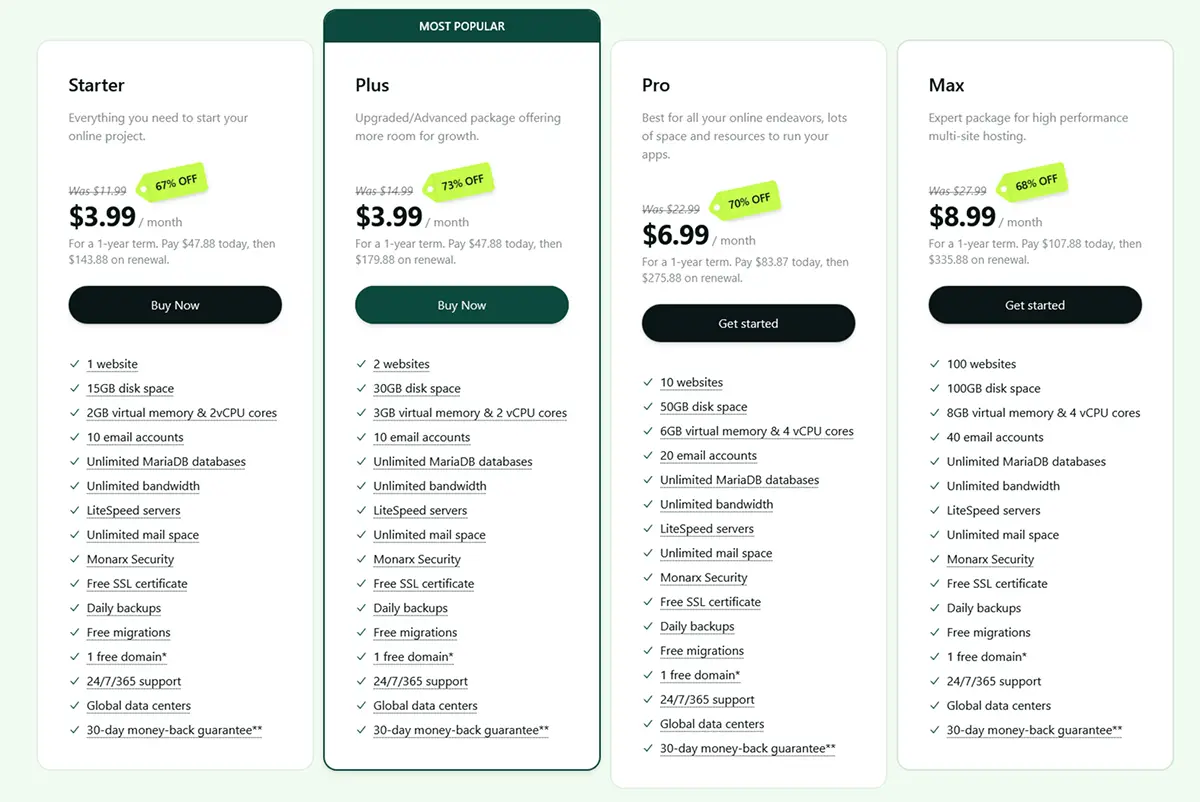
The shared hosting Starter plan at $3.99/month (67% off) gives you 1 website, 15GB disk space, 2GB virtual memory, unlimited MariaDB databases, free SSL, LiteSpeed servers, and a free domain. The Plus plan is also $3.99/month (73% off) and includes 2 websites with 30GB storage. Renewal jumps to $11.99/month on Starter and $14.99/month on Plus, which is the single biggest thing to budget for.
The Pro plan at $6.99/month (70% off) is where most small business owners should probably land. You get 10 websites, 50GB disk space, 6GB virtual memory, and 4 vCPU cores. The Max plan at $8.99/month (68% off) handles 100 websites with 100GB storage and 8GB RAM. If you're running multiple client sites or a single heavy WordPress site, Pro or Max is worth the extra couple of dollars over the entry plans.
The managed WordPress plans start at $6.95/month (44% off) for WordPress Small, which includes 1 install, 30,000 monthly visits, 20GB storage, and free SSL. WordPress Medium at $11.96/month (52% off) is the most popular tier with 5 installs and 120,000 visits. WordPress Advanced at $19.97/month (60% off) and WordPress Turbo at $29.97/month (64% off) scale up to 10 installs and 500,000 visits. All managed plans include Cloudflare Enterprise CDN and Rocket.net infrastructure.
For managed cPanel VPS, pricing starts at $28.75/month for 4GB RAM and scales to $916.25/month for the 256GB beast. Reseller hosting starts at $24.50/month for 30 cPanel accounts and goes up to $79.50/month for 150 accounts. Both lines include the full cPanel/WHM/CloudLinux/LiteSpeed stack.
⏰ Active coupon (expires April 27, 2026):
Use code MWP10X-APR13 at checkout for an extra 10% off annual managed WordPress plans. Applies to WordPress Small through Turbo tiers only. Stacks on top of the intro discount, so WordPress Small effectively drops to around $6.25/month.
Apply Coupon at Hosting.comOne thing to watch out for: renewal prices run nearly 2 to 3 times the intro rate. The shared Starter plan that's $3.99/month today renews at $11.99/month. That's normal in hosting, but the jump is steeper than Hostinger. If you plan to stay long-term, lock in the longest term possible at checkout (3 years beats 1 year for total cost). The 30-day money-back guarantee is your safety net.
"I could not be more pleased with their service. I had to migrate my primary site and 11 add-on domains, which was no easy feat, but the support and migration team worked through every problem."
— Hosting.com customer, recent reviewPerformance: are the Turbo servers still fast?
Hosting.com's biggest selling point is speed, so this is the section that actually matters. The infrastructure is genuinely premium for the price. You get AMD EPYC processors, NVMe SSD storage, LiteSpeed web server, and Cloudflare Enterprise CDN on the managed WordPress plans. On paper, that stack competes with hosts charging three times as much.
Independent testing shows real-world loading speeds of 0.8 to 2.2 seconds on shared hosting plans, which is solid but not elite. GTmetrix tests on the Dallas data center scored "A" overall with strong US and European performance. Singapore and Australia lagged by about 1 to 1.5 seconds, typical for hosts without extensive Asia-Pacific infrastructure. If your audience is in those regions, pick the Sydney data center at signup or add Cloudflare.
One honest caveat: recent stress tests show Hosting.com's shared hosting handled 25 out of 50 concurrent virtual users before performance degraded. Competitors like HostArmada passed the same test without issues. For a personal blog or low-traffic business site, this doesn't matter. For a site expecting thousands of concurrent visitors during a launch, you'll want VPS or managed WordPress rather than shared.
Uptime was 100% during recent multi-week monitoring, lining up with the 99.9% uptime guarantee. The cloud-based architecture (moved over during the rebrand) includes load balancing, which helps handle traffic spikes without crashing.
What real users are saying in 2026
We went through recent reviews on Trustpilot, HostAdvice, Google, and Reddit to see how customers feel about the rebranded Hosting.com.
The platform holds 4.7 out of 5 on Google (2,960 reviews) and 4.7 out of 5 on HostAdvice (1,902 reviews). The most consistent praise goes to the support team, particularly via phone, and to the Turbo server performance on WordPress sites. Customers repeatedly mention that their sites load noticeably faster after migrating from GoDaddy, Bluehost, or Hostgator.
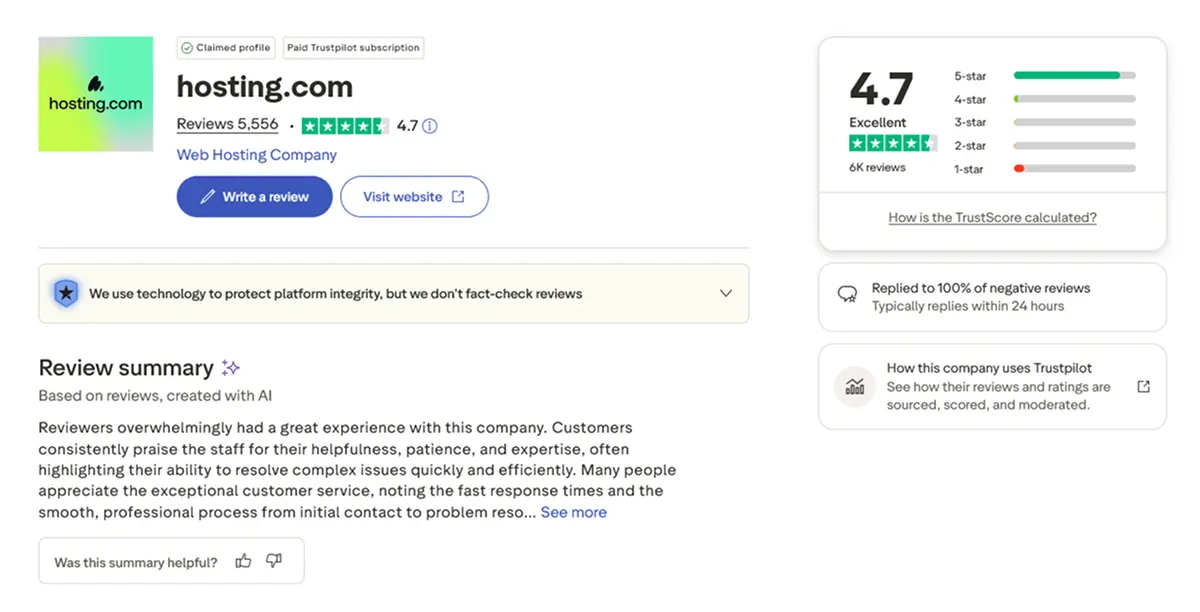
The common complaints are predictable. Renewal pricing comes up in nearly every negative review, with customers surprised by the jump from intro to renewal rates. The incomplete rebrand also frustrates some users since old A2 branding still appears in control panel sections. And a few reviewers noted live chat quality has dipped post-rebrand, though phone support remains strong.
One Trustpilot reviewer who's run a media company since 1993 wrote the support staff are "knowledgeable, thorough, pleasant" and that they've saved his domains from hackers multiple times. Another called Hosting.com "an alternative to Hostgator" after a bad experience there, noting he was "super happy with the speed of my websites." These line up with what independent tests show.
Honest pros and cons breakdown
What we like
What could be better
Who should use Hosting.com (and who shouldn't)
Hosting.com is a strong choice if you're running WordPress and need genuine speed without enterprise pricing, you want phone support for the nights when something breaks at 2 AM, or you need managed WordPress with Cloudflare Enterprise CDN included. The Rocket.net-powered WordPress tier at $11.96/month is particularly underrated against Kinsta or WP Engine.
Skip Hosting.com if you're a complete beginner who's never seen cPanel (Hostinger's hPanel is genuinely easier), you want the absolute lowest 3-year cost, or you need high concurrent traffic handling on a shared plan. The renewal pricing is the biggest honest warning. Budget for year two before you sign up for year one.
How Hosting.com stacks up against the competition
Hosting.com sits in a crowded budget-to-mid-market hosting space. Here's how it compares against the hosts most people are also considering.
Hosting.com vs Hostinger. Hostinger wins on long-term cost, with intro prices from $2.99/month and lower renewal rates. Hosting.com wins on raw speed (LiteSpeed on every Turbo plan) and phone support. Beginners focused on the lowest bill: Hostinger. WordPress sites where load time matters: Hosting.com.
Hosting.com vs Bluehost. Bluehost has better WordPress.org integration as an official recommended host. Hosting.com has faster infrastructure, better phone support, and a lower WordPress managed price. For a new WordPress site, Hosting.com's managed WordPress at $6.95/month beats Bluehost's equivalent on specs.
Hosting.com vs Kinsta. Kinsta wins on polish, developer tools, and premium managed experience. Hosting.com wins by nearly 80% on price. Kinsta's entry plan is $35/month for 25,000 visits. Hosting.com's WordPress Small is $6.95/month for 30,000 visits. If you need Kinsta's tooling, pay for it. If you just need fast managed WordPress, Hosting.com is dramatically cheaper for similar infrastructure.
How to get started without the headaches
Signing up for Hosting.com is straightforward but a few things are worth knowing upfront.
Start by picking your hosting type first: shared, managed WordPress, VPS, or reseller. Don't default to the cheapest Starter shared plan if you're running WordPress. The managed WordPress Small plan at $6.95/month comes with Cloudflare Enterprise CDN, malware protection, and automated backups, which you'd have to configure separately on shared hosting.
Next, pick your data center carefully. US audience: Dallas or Buffalo. Europe: London or Frankfurt. Asia-Pacific: Singapore. Australia/NZ: Sydney. This matters more than you'd think for load times, and you can't change later without a migration.
At checkout, go for the longest term you're comfortable with. 1-year is $3.99/month on shared Starter. 3-year commitment drops the effective monthly cost and locks in the intro rate longer. The 30-day money-back guarantee gives you a safety net if things don't work out.
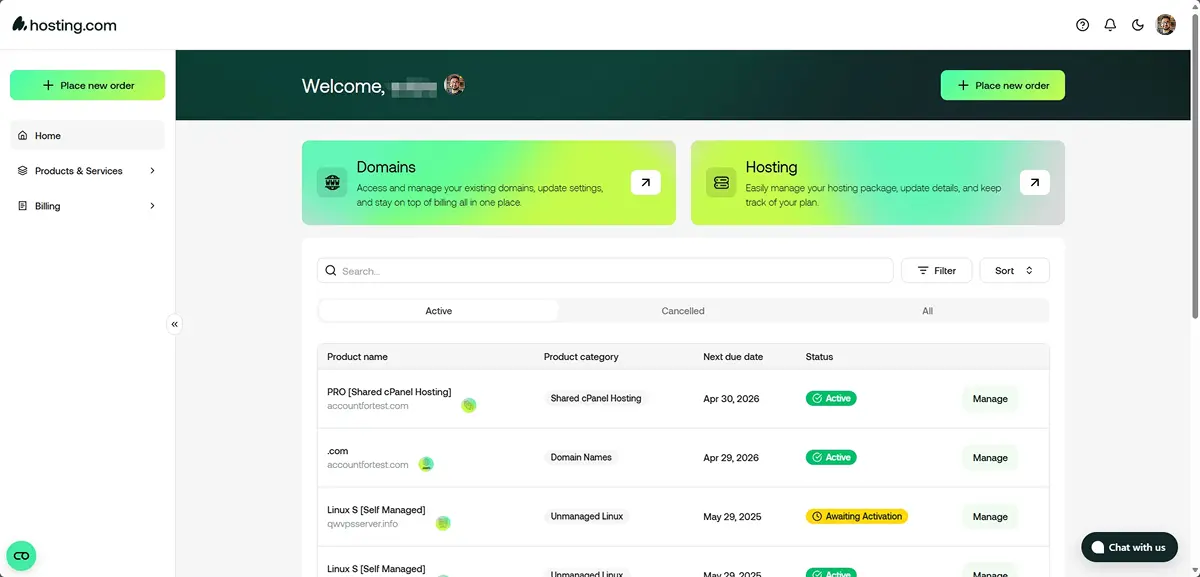
After signup, your site goes live in minutes. WordPress is pre-installed on all WordPress plans, saving you the database and admin setup. Shared plans use cPanel with Softaculous one-click installers for every major CMS. If you're brand new, spend your first hour setting up DNS, installing SSL (free and automatic), and configuring email. Support via live chat, phone, and ticket is always one click away.
"Best internet support I have had since 1993 when internet first went public. I have been through several hosts with my media company and school and hosting.com support staff are knowledgeable, thorough, pleasant and treat clients with respect."
— ICU Media, Trustpilot reviewFrequently asked questions
World Host Group acquired A2 Hosting in January 2025 and rebranded it to Hosting.com in April 2025. Same team, same Turbo server technology, same data centers. If you were an A2 Hosting customer, your account moved over automatically with no action needed. The rebrand came with a redesigned dashboard, a new managed WordPress product powered by Rocket.net, and AI application hosting.
Shared hosting starts at $3.99/month on a 1-year term for the Starter plan. The Plus plan is also $3.99/month, Pro is $6.99/month, and Max is $8.99/month. Managed WordPress starts at $6.95/month for WordPress Small. Managed cPanel VPS starts at $28.75/month. Reseller hosting starts at $24.50/month. Renewal prices are significantly higher than intro rates, so budget for year two carefully.
Yes. Hosting.com is A2 Hosting under a new name. The company was founded in 2003 in Ann Arbor, Michigan, acquired by World Host Group in January 2025, and rebranded in April 2025. The core infrastructure, Turbo LiteSpeed servers, NVMe SSD storage, AMD EPYC processors, and the Guru Crew support team all came over intact. Some A2 branding still appears in legacy documentation and support scripts.
Hosting.com is particularly strong for WordPress. The managed WordPress product is powered by Rocket.net's enterprise infrastructure and includes Cloudflare Enterprise CDN, automated backups, malware protection, and AMD EPYC processors. Plans start at $6.95/month for the Small tier. The WordPress Turbo plan at $29.97/month handles up to 500,000 visitors per month with 64% off intro pricing.
Yes. Hosting.com offers a 30-day money-back guarantee on shared and WordPress hosting plans. After the 30-day window, you can still get a prorated refund for the unused portion of your service up to 90 days. VPS and dedicated servers have different refund terms, so check the specific plan before committing.
Hosting.com is worth it if you want Turbo server performance with LiteSpeed and NVMe SSDs at shared hosting prices, or if you need phone support which is rare at this price point. It's less ideal for absolute beginners (Hostinger's hPanel is simpler) or anyone shopping purely on long-term cost since renewal prices jump significantly. For WordPress sites that need speed without enterprise pricing, it's one of the better options available.
Final verdict: is Hosting.com worth it in 2026?
Yes, Hosting.com is a legitimately good hosting provider in 2026, particularly for WordPress sites and anyone who values speed and phone support over rock-bottom pricing.
The platform's biggest strengths are the genuine performance infrastructure (LiteSpeed, NVMe SSDs, AMD EPYC processors, Cloudflare Enterprise CDN on managed plans), the 24/7 phone support that most budget hosts have abandoned, and the Rocket.net-powered managed WordPress tier that punches way above its $6.95/month price point. The 10 global data centers with pickable locations and free migrations on every plan round out a solid product.
The biggest weaknesses are real but predictable. Renewal pricing runs 2 to 3 times the intro rate, steeper than Hostinger. The rebrand is visibly incomplete with old A2 branding still showing in corners of the platform. Shared hosting concurrency is lower than competitors like HostArmada. And live chat quality has been uneven since the transition. None are dealbreakers for the right customer, but they're worth knowing before you commit.
If you've been considering it, the 30-day money-back guarantee is the easiest way to test drive the platform. Sign up on an annual term, migrate a site, put the Turbo servers through real load. You'll know within the first week whether the speed and support match what this review describes.
Ready to try Hosting.com? Shared hosting starts at $3.99/month, managed WordPress from $6.95/month. 30-day money-back guarantee on all plans.
Visit Hosting.com