

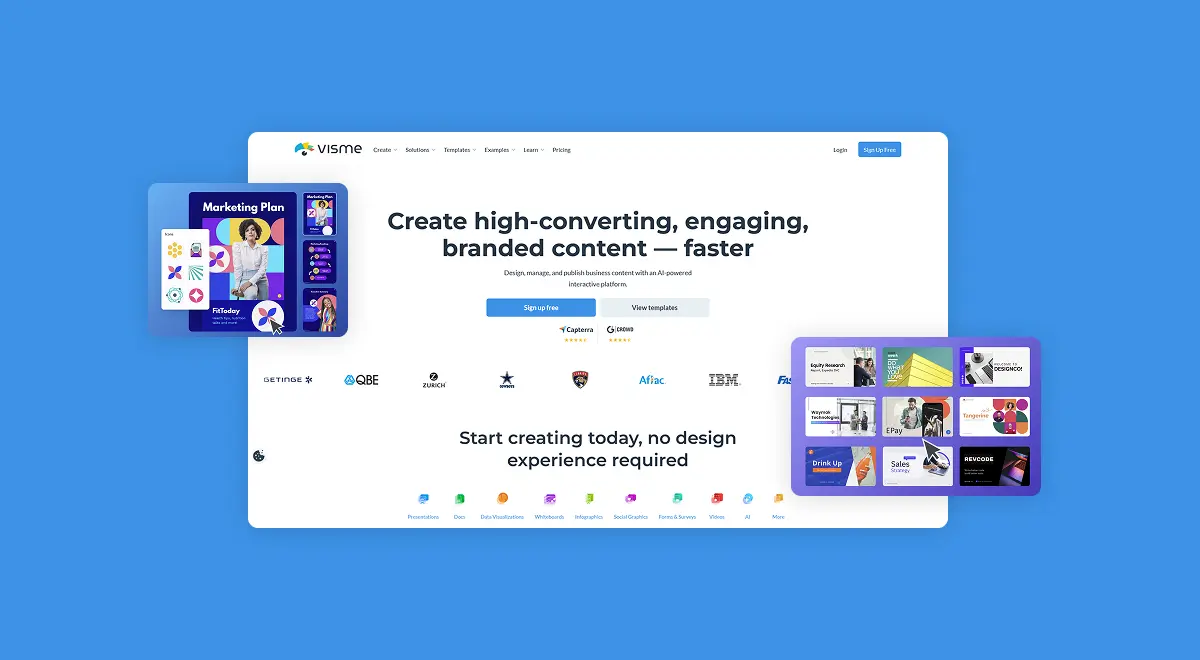
You're staring at PowerPoint trying to make a deck that doesn't look like it was built in 2009. The infographic you need by Friday still doesn't exist. Your team can't agree on which colors are actually on-brand. Then someone says you should try Visme! The question is whether Visme actually delivers on the all-in-one promise, or whether $24.75/month is just Canva with a different logo.
This review cuts through the marketing and looks at what Visme really delivers in 2026, where it genuinely wins, and whether it deserves a spot in your design stack.
Try Visme freeWhat is Visme and what makes it different?
Visme launched in 2013 with a single focus: visual content creation that doesn't require a designer on staff. No Adobe learning curve, no separate tools for presentations, infographics, and reports. The platform now serves 27 million+ users globally, including teams at IBM, the Denver Broncos, Aflac, Zurich, Intuit, and the Florida Panthers.
What makes Visme different from the rest of the design tool market is the breadth of what you can create in one editor. Most tools pick a lane. Canva goes wide on social graphics. PowerPoint owns presentations. Piktochart focuses on infographics. Visme covers presentations, infographics, social graphics, videos, GIFs, reports, brochures, forms, surveys, whiteboards, and printables in a single workspace, with one brand kit and one set of analytics across all of it.
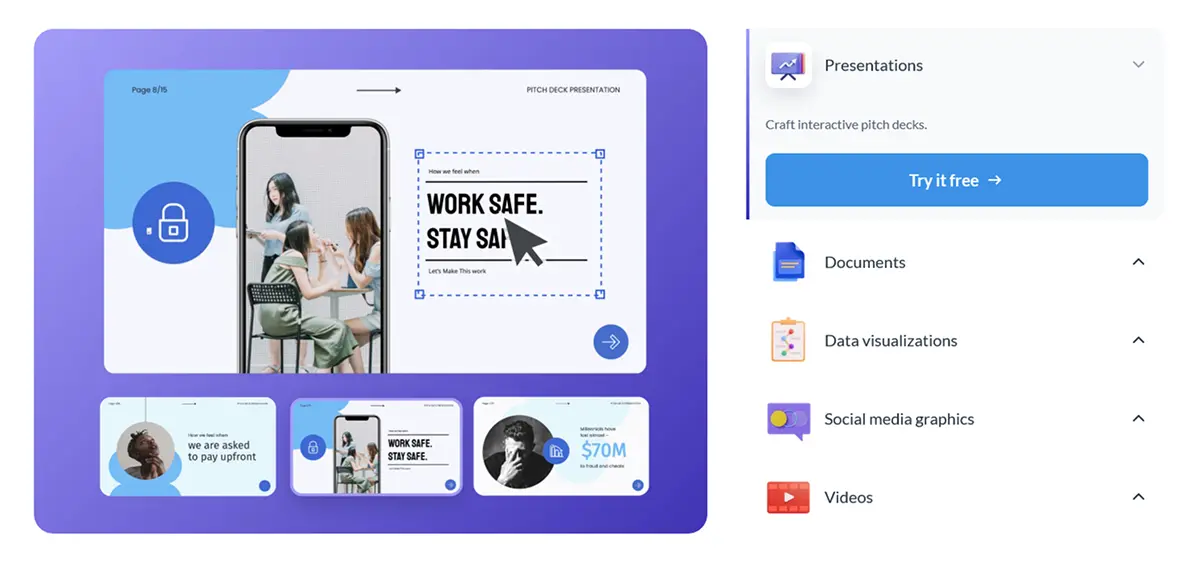
The advantages show up in real numbers. Visme AI turns text prompts into ready-to-edit designs. The Brand Wizard pulls your brand colors and fonts straight from your website URL. Real-time collaboration with role-based access lets your team edit at once without overwriting each other. Analytics tracking shows who viewed your content, how long they stayed, and where they dropped off.
One thing to know upfront: Visme is not Canva. The template library is smaller and less social-focused. The editor is heavier and prioritizes business and data visualization over quick social posts. That's why pricing skews higher than Canva and why companies like IBM use it instead.
Who is Visme built for?
Visme works best for marketing teams, sales teams, agencies, educators, and any business that produces regular branded visual content. The brand kit, collaboration tools, and analytics aren't built for someone making a single birthday invite. You're paying for systems that keep a 10-person team's content on-brand across hundreds of projects.
Marketing and sales teams running content at scale get the most value. The Pro plan at $24.75/month unlocks the brand kit, custom templates, content calendar, and engagement analytics. One Visme account often replaces a separate presentation tool, infographic tool, video tool, and form tool, with consistent branding stitched across all of them.
On the other hand, Visme is probably not right for solo creators making a few graphics a month, students on tight budgets, or anyone whose primary need is social media post design. The free Basic plan is fine for testing, but it watermarks every export. For lighter use cases, check our Canva vs Piktochart comparison for tools that fit casual users at lower price points.
If you're running a marketing team that produces decks, reports, and infographics every week, an agency creating client-branded content, or an enterprise where brand consistency directly affects how customers perceive you, Visme is exactly the right tool.
The features that actually matter in 2026
Visme ships a lot of features. Here are the ones that actually affect your day-to-day content production.
All-in-one creation across 30+ content types
Every Visme account opens the door to presentations, infographics, social graphics, videos, GIFs, documents, reports, brochures, forms, surveys, whiteboards, and flyers in the same editor. No switching tools, learning new shortcuts, or copying assets between platforms. The library covers over 30 content formats, all sharing the same brand kit, fonts, and template engine. For teams creating mixed content, this single fact saves hours every week.
Brand kit and Brand Wizard for consistency
This is the feature most people miss when comparing prices. Visme's Brand Wizard takes your website URL and automatically extracts your logo, colors, and fonts into a reusable brand kit. Every team member designing in your account inherits that kit, so a junior marketer can't accidentally produce off-brand content. For agencies juggling multiple client brands, this turns a usual nightmare into a 30-second setup.
Real-time collaboration with role-based access
Every Pro and Enterprise plan includes real-time collaboration with comments, version history, and role-based permissions. Give a contractor edit access to one project without exposing the rest. Reviewers can leave comments without changing the design. Approval workflows on Enterprise plans add a structured signoff step. For distributed teams, this replaces the email-the-PDF-back-and-forth that wastes everyone's time.
Interactive content with hotspots, animations, and links
Visme's interactive content engine lets you add hotspots, hover effects, clickable menus, animated elements, video embeds, and external links inside your designs. Publish a presentation as an embeddable web experience, share it as a tracked link, or download it as HTML5. Most design tools stop at static export. Visme's interactive content adds a layer of engagement that genuinely changes how people consume your work.
Want to try Visme without committing a dollar? The Basic plan is free forever with unlimited projects and the core editor, no credit card needed. Every paid plan can be downgraded or canceled anytime, and Visme offers discounts for students, educators, and nonprofits, so you can test the full experience risk-free before deciding.
Start free with VismeVisme pricing in 2026: what you'll actually pay
Visme's pricing is transparent and tiered by features, not project count. Here's what you actually pay in 2026 and which plan you'll probably end up on.
The smart move for most people is to start on the free Basic plan (no credit card needed) and figure out which tier actually fits your output. You can upgrade anytime once you hit a paid feature you actually need, and you can cancel anytime during a paid plan if it's not landing.
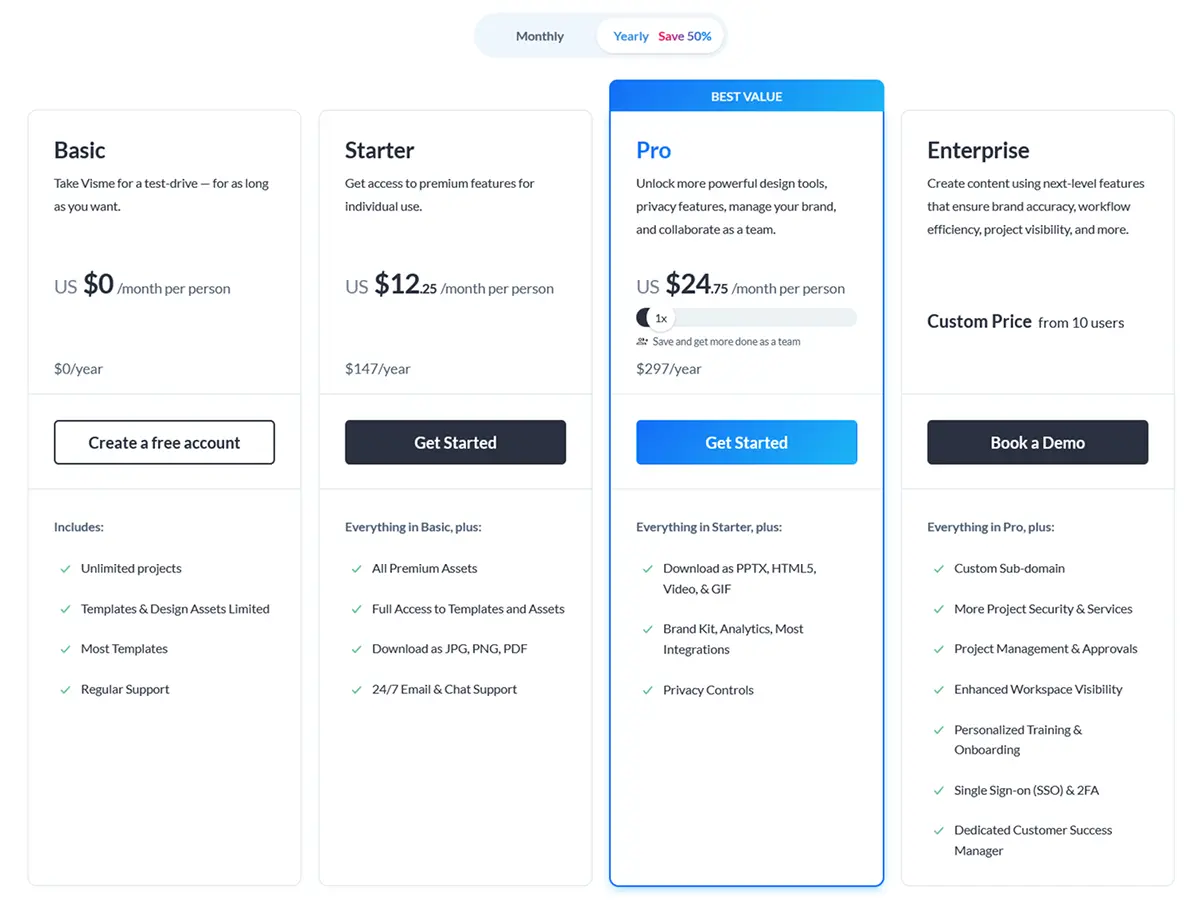
Once you're ready to pick a plan, here's the honest breakdown. The Basic plan is free forever: unlimited projects, the core editor, basic templates, and downloads as JPG, PNG, and PDF. The catch is the Visme watermark on every export. It's fine for testing or personal use, not for client work.
The Starter plan at $12.25/month annual ($147/year) removes the watermark, unlocks all premium templates, and adds 24/7 chat support. It's where individual creators and freelancers actually land.
The Pro plan at $24.75/month annual ($297/year) is where most serious users land, and Visme labels it Best Value for a reason. You get the brand kit, custom templates, HTML5 and video exports, content calendar, engagement analytics, full AI access, and priority support. For the extra $12.50/month over Starter, you unlock the systems that actually save a working team time.
Enterprise plans start at 10 users with custom pricing, adding SSO, advanced security, dedicated account management, custom training, and approval workflows. Larger marketing organizations and Fortune 500 teams typically land here.
One thing to watch: Visme bills annually for the listed monthly prices. If you pick monthly billing, prices roughly double (Starter goes to $29/month, Pro to $59/month). The annual commitment saves real money, but factor it in before you sign up.
"At the Broncos, we recommend Visme to other teams, brands, or organizations looking for a one-stop shop to create internal and external collateral. Plus, the customer service is unmatched!"
— Matt Swiren, Manager of Partnership Marketing, Denver BroncosThe Visme AI suite: what's hype and what works
Every design tool launched an AI feature in 2024 and 2025. Most are wrappers around ChatGPT with a marketing budget. Visme's AI suite is one of the few that genuinely shifts how fast you can produce work.
On AI generation, the Visme AI Designer turns a text prompt into a full editable design. You type "quarterly sales report for SaaS company" and you get a draft with charts, sections, and brand-ready styling that you can refine. The AI Presentation Maker does the same for slide decks. The AI Document Generator handles long-form reports. Visme reports a 70% productivity increase across teams using the AI suite, and verified G2 reviews repeat the same theme: AI gets you to a usable first draft in minutes, then you spend your time refining instead of building from scratch.
The suite also includes an AI Image Generator, AI Image Edit Tools for background removal, an AI Brand Design Tools set for on-brand outputs, and an AI Text Generator for headlines and copy. Every tool is built into the editor, so you don't paste prompts into ChatGPT and bring assets back. It's all one workflow.
One honest caveat: complex presentations still need manual refinement. AI gets you to draft quality fast, but decision-ready decks with custom data and specific brand voice still take a human touch. Treat the AI as a head start, not a finished product.
What real users are saying in 2026
We went through recent reviews on G2, Capterra, Trustpilot, and Software Advice to see what actual Visme customers think in 2026.
The platform holds a 4.6 out of 5 on G2 from 476 reviews and 4.5 out of 5 on Capterra from 719 reviews, which is genuinely strong for a design platform. Marketing teams, agencies, educators, and solo creators all report similar experiences.
The most consistent praise goes to the template variety, the all-in-one workflow, and the customer support team. One recurring pattern: users coming from PowerPoint or scattered Adobe tools report consolidating four or five subscriptions into one Visme account. The infographic and data visualization features pull frequent specific praise.
Common complaints are predictable. Editor performance comes up across reviews. Heavy projects with lots of data points slow the editor down, and a few users mention text editing glitches with copy-paste and undo. A handful of users also report billing and refund frustrations, particularly around auto-renewals. There's also no Android app, only iOS, which limits mobile editing for a chunk of the user base.
Honest pros and cons breakdown
So is Visme good across the board or are there real trade-offs? Here's our straight take after reviewing features, pricing, user feedback, and the G2 data.
What we like
What could be better
Who should use Visme (and who shouldn't)
Visme is a strong choice if you run a marketing team producing regular branded content, manage an agency creating client deliverables, work in sales building proposals and pitch decks, teach courses needing interactive learning content, or run a business where brand consistency across visuals directly affects revenue. The free Basic plan plus the ability to cancel any paid plan anytime makes testing genuinely risk-free.
Skip Visme if you make a single graphic a month, you're a high-volume social media creator who needs Canva's deeper template library, you're on Android and need full mobile editing, or your budget is under $10/month. For those use cases, free tiers like Canva's free plan or PowerPoint Online get the job done at a fraction of the cost.
How Visme stacks up against the competition
Visme competes in the visual content creation space. Here's how it compares against the alternatives most people are also considering in 2026.
Visme vs Canva. Canva starts at $15/month for Pro, Visme Pro is $24.75/month annual. Canva has a deeper template library and stronger social media tools. Visme wins on data visualization, interactive content, brand management, and analytics. For high-volume social creators, Canva is a better fit. For business teams producing presentations, infographics, and reports with real branding requirements, Visme is the better long-term pick.
Visme vs PowerPoint. PowerPoint comes bundled with Microsoft 365. Visme is a separate subscription. PowerPoint wins on offline reliability and integration with the Microsoft stack. Visme wins on modern templates, interactive content, AI tools, and the breadth of formats beyond presentations. For teams that need infographics, video, and interactive content alongside decks, Visme replaces three tools.
Visme vs Piktochart. Piktochart focuses narrowly on infographics. Visme covers the same ground plus presentations, video, forms, and reports. For teams that need more than infographics, Visme is the broader investment.
How to get started without the headaches
Signing up for Visme is straightforward, but a few things are worth knowing before you commit.
Start by creating a free Basic account first. No credit card needed, no time limit. Build one or two real projects to see if the editor fits how you work. The Basic plan watermarks exports, but that's fine for testing the workflow before you pay.
Next, run the Brand Wizard before designing anything. Drop in your website URL and Visme pulls your logo, colors, and fonts into a reusable kit. Every template you customize will automatically pull your brand into it. Skip this and you'll redo the same brand work on every project.
At checkout, commit to annual billing if you're sure. The listed prices are annual rates. Monthly billing roughly doubles the cost, so if you've decided Visme is a fit after the free plan, annual saves real money.
After signup, connect your team and set up roles before scaling output. Decide who can edit, who can comment only, and who needs admin access. Setting this up in week one saves messy permission cleanup later.
"We use Visme not just for reporting but also for engaging our stakeholders and our clients in the evaluation process so that they're a participant. They're not just receiving a report at the end; they're engaged throughout the entire process."
— Robert Blagg, Director of Evaluation, UCLA Luskin School of Public AffairsFrequently asked questions
Visme is genuinely good for both presentations and infographics, and it's one of the few tools that actually does both well in the same platform. The template library covers presentations, infographics, social graphics, reports, brochures, and forms in one workspace. The Visme AI Designer turns a text prompt into a ready-to-edit design, and the AI Presentation Maker builds full slide decks from a topic. The 4.6 out of 5 G2 rating from 476 reviews and 4.5 out of 5 Capterra score from 719 reviews back this up. The trade-off is performance. Heavy decks with lots of data slow the editor down, and editing text can feel clunky compared to PowerPoint.
Visme has four plans in 2026. The Basic plan is free forever with unlimited projects and the core editor, but every export carries a Visme watermark. The Starter plan is $12.25/month billed annually ($147/year) and removes the watermark, adds premium templates, and gives you JPG, PNG, and PDF downloads. The Pro plan is $24.75/month billed annually ($297/year) and unlocks the full feature set including HTML5 exports, video, GIF, the brand kit, analytics, and full AI access. Enterprise is custom pricing starting at 10 users with SSO, dedicated success manager, and security features. Most serious users land on Pro because that's where the real value is.
For teams and businesses creating regular visual content, yes, Visme is worth it. The Pro plan at $24.75/month bundles presentation building, infographic design, video creation, brand management, and AI tools that would otherwise need three separate subscriptions. For solo creators making occasional graphics, Canva at $15/month is cheaper and has a deeper template library. The honest test is content volume. If you're creating presentations, infographics, and reports every week, Visme pays for itself in time saved. If you make a few graphics a month, the free Basic plan or Canva makes more sense.
Visme's pros are real. You get an all-in-one platform for presentations, infographics, video, social graphics, and forms in one editor. The Visme AI Designer generates full designs from text prompts. The brand kit keeps colors and fonts consistent across the team. Real-time collaboration works smoothly. The G2 rating sits at 4.6 out of 5 from 476 reviews. The cons are honest too. The editor slows down on heavy projects with lots of data points. Text editing has glitches with copy-paste and undo. Premium content is locked behind paid plans. There's no Android app, iOS only. Customer support around billing and refunds gets mixed reviews.
Visme has a free Basic plan that doesn't expire. You get unlimited projects, the full template library access (with limited premium assets), and the core editor. The catch is the Visme watermark on every export and limited download formats. The free plan is genuinely useful for testing whether Visme fits your workflow before committing to paid. Paid plans don't have a traditional time-limited free trial, but you can downgrade or cancel anytime, and Visme offers discounts for students, educators, and nonprofits. The Basic plan plus the ability to upgrade later removes the usual signup friction.
Visme beats PowerPoint on interactive content, modern templates, and AI features. PowerPoint still wins on deep formatting control and offline reliability. Against Canva, Visme is more focused on business and data visualization. Canva has a bigger template library and stronger social media tools. Canva is also cheaper at $15/month for Pro versus Visme Pro at $24.75/month. The real difference shows up in use case. For interactive presentations, infographics with live data, branded reports, and analytics tracking, Visme is the better pick. For social posts, marketing graphics, and team-wide design at scale, Canva fits more workflows. Both have free tiers worth testing.
Final verdict: is Visme worth it in 2026?
So, is Visme good enough to justify a paid spot in your design stack in 2026? Yes, for the right use cases. Not as a one-size-fits-all answer, but as the clear pick for teams that need presentations, infographics, video, and branded content in one workspace.
The platform's biggest strengths are the all-in-one breadth (30+ content formats in one editor saves real time and money), the Visme AI suite (genuine first-draft acceleration, not a ChatGPT wrapper), and the brand kit and Brand Wizard (auto-extracted brand consistency that scales across teams).
The biggest weakness is editor performance under load. Heavy projects with complex data slow things down, and the text editing has rough edges with copy-paste and undo. The lack of an Android app limits mobile editing for a chunk of users. And the annual billing requirement for the listed prices catches some people off guard.
If you've been considering it, the free Basic plan (no credit card needed) is the cleanest way to evaluate fit. Build a few real projects, run the Brand Wizard, test the AI Designer, see how the editor handles your typical workload. If it clicks, the Pro plan at $24.75/month annual unlocks the full feature set. If not, you've spent zero dollars finding out. For most marketing teams and content-driven businesses, Visme earns its spot in 2026.
Visme starts free, no credit card needed. If you're a team producing weekly branded content, the Pro plan at $24.75/month annual unlocks the brand kit, full AI access, HTML5 exports, and engagement analytics.
Start free on Visme