

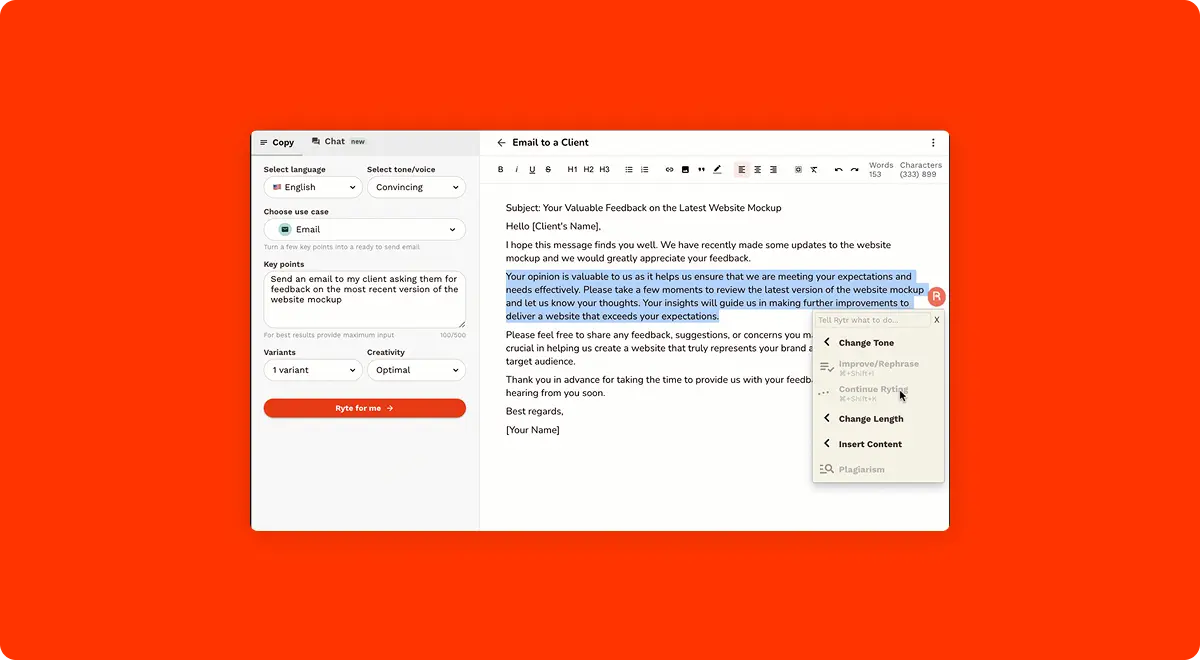
When people think of AI writing tools, ChatGPT and Jasper usually dominate the conversation. But there's a tool that 8 million content writers already use daily, and most people have never heard of it. Rytr costs $9/month for unlimited AI content generation, covers 40+ use cases in 30+ languages, and runs on a team of just four people. Companies like Pfizer, Dell, Ford, and Payoneer use it. The free plan is permanent with no credit card required. But the AI model powering it hasn't been publicly disclosed, long form content quality is inconsistent, and there are zero native integrations with WordPress or Zapier. Here's everything you need to know before signing up.
Get Rytr it's FreeWhat is Rytr?
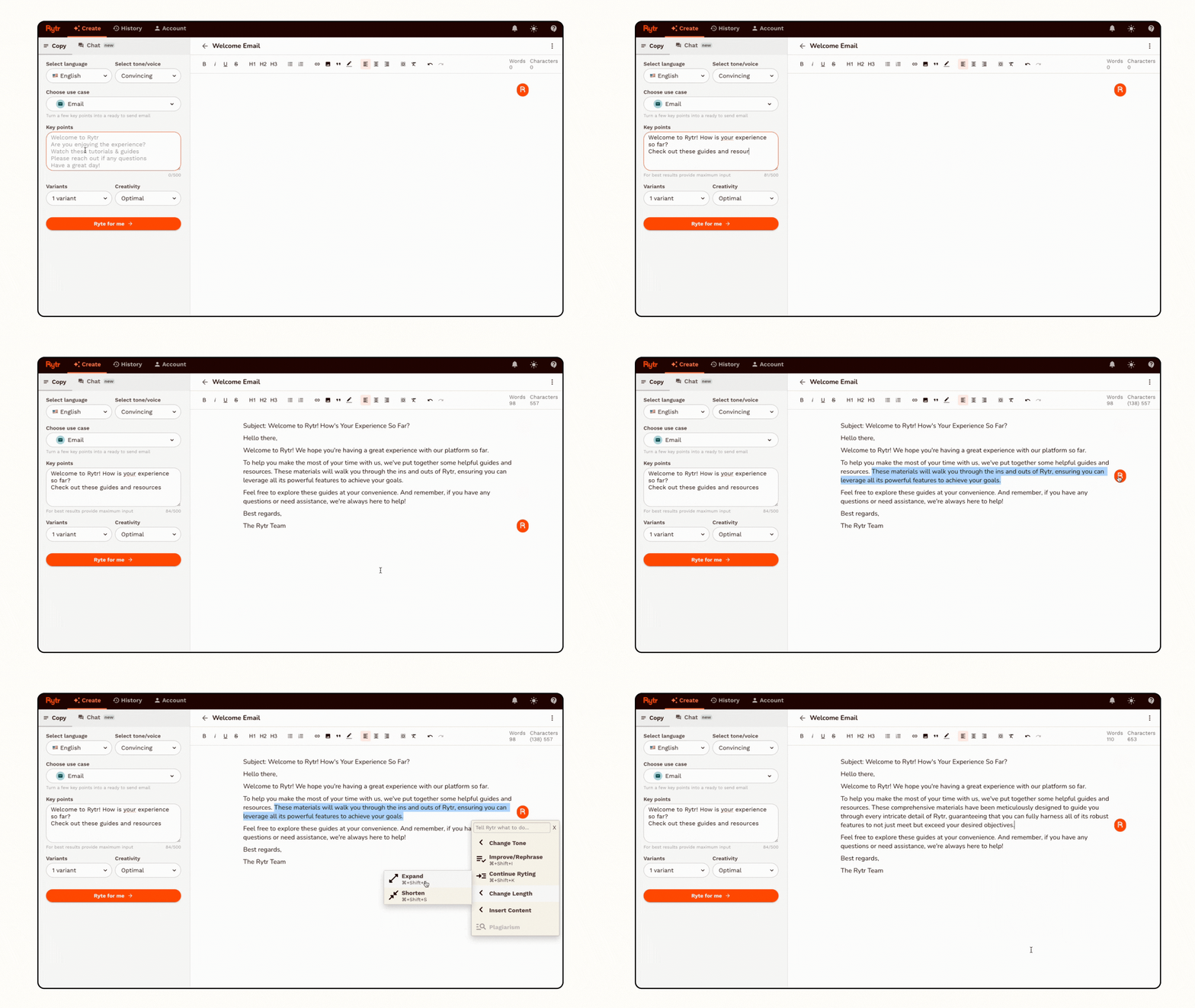
Rytr is an AI powered writing assistant designed to help you generate short to medium form content quickly. It works through a template based system: you pick a use case (like "Email" or "Blog Idea & Outline"), select a tone of voice, provide a brief description of what you need, and Rytr generates multiple variants in seconds. You then pick the best one, edit it, and you're done.
The platform was launched in 2021 and is headquartered in Walnut, California. Rytr was completely bootstrapped with zero outside funding and was later acquired by Copysmith in October 2022 to form a parent company called Copyrytr. Despite the acquisition, Rytr continues operating independently with its own brand and platform. What's remarkable is the team size. The entire company runs on just four people, yet they serve over 8 million registered users worldwide. Tracxn ranks Rytr 13th among 289 active competitors in the AI writing space.
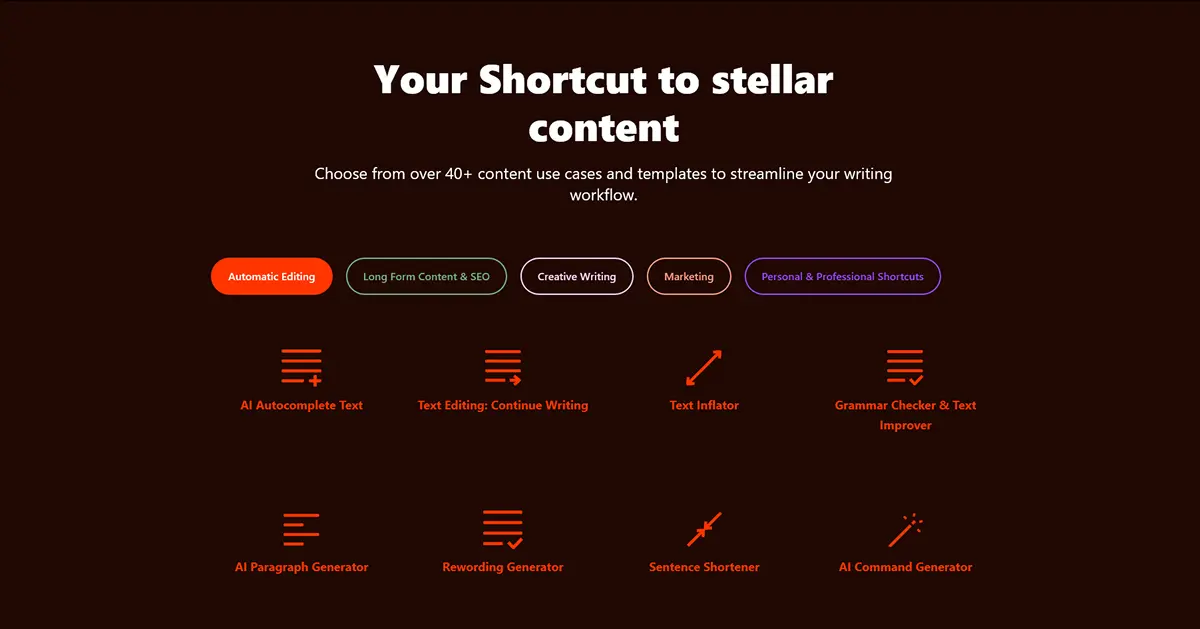
What sets Rytr apart from bigger competitors is the simplicity combined with the price. While Jasper charges $49/month for their Creator plan and even ChatGPT Plus costs $20/month, Rytr gives you unlimited AI content generation for $9/month. You don't need to learn prompt engineering or figure out how to structure your requests. The templates do the thinking for you. Pick "Product Description," enter your product name and features, choose "Convincing" as the tone, and you get two or three polished variants instantly.
The tradeoff is depth. Rytr excels at short form content like emails, social media captions, product descriptions, ad copy, and CTAs. It handles these tasks faster and more consistently than typing prompts into ChatGPT. But when it comes to long form blog posts, research articles, or anything requiring sustained argumentation across multiple paragraphs, the output gets generic and repetitive. That's the honest reality you should know upfront.
Who is Rytr built for?
Rytr works best for people who need fast, structured content in specific formats without spending hours crafting prompts or editing lengthy AI outputs. If your daily work involves churning out emails, product descriptions, social media posts, or marketing copy, Rytr was built specifically for you.
Freelance writers and copywriters get immediate value. When you're managing multiple clients and need to produce dozens of product descriptions, email variations, or social media captions per day, Rytr's template system eliminates the blank page problem entirely. Select the use case, plug in the details, generate two or three variants, pick the best one, and move on. At $9/month, it pays for itself after one or two tasks.
Small business owners who handle their own marketing will appreciate how Rytr removes the guesswork from writing. Need a professional email response to a client? Rytr generates one in 5 seconds. Need Facebook ad copy? Pick the "Facebook, Twitter, LinkedIn Ads" use case and describe your offer. Need SEO meta titles for your product pages? There's a dedicated template for that too.
Marketing teams on a tight budget can use the Premium plan ($29/month) to give multiple team members access to consistent, on brand content. The My Voice feature lets you train Rytr on your brand's writing style, so everyone on the team generates content that sounds like it came from the same person.
On the other hand, if you need to write long form blog posts or in depth articles, Rytr alone won't cut it. The outputs are typically one to three paragraphs at a time, and they lack the depth and nuance that long form content requires. If you're a technical writer producing documentation, whitepapers, or research content, you'll find the output too shallow. And if you need real time collaboration features or native integrations with tools like WordPress, Zapier, or HubSpot, Rytr doesn't offer any of those.
The features that actually matter
Rytr has a solid set of features beyond basic text generation. Here's what actually makes a difference in your daily workflow.
On the Premium plan, you can also create custom use cases tailored to your specific workflows. If you regularly write a type of content that doesn't fit any existing template, you can build your own with custom instructions and save it for repeated use.
My Voice: brand voice matching
The My Voice feature lets you train Rytr to write in your specific voice. You provide a sample of your writing, and Rytr analyzes your style, tone, vocabulary, and phrasing patterns. After that, every piece of content it generates will attempt to mirror your voice instead of sounding like generic AI output. You can create multiple voice profiles for different clients or brands.
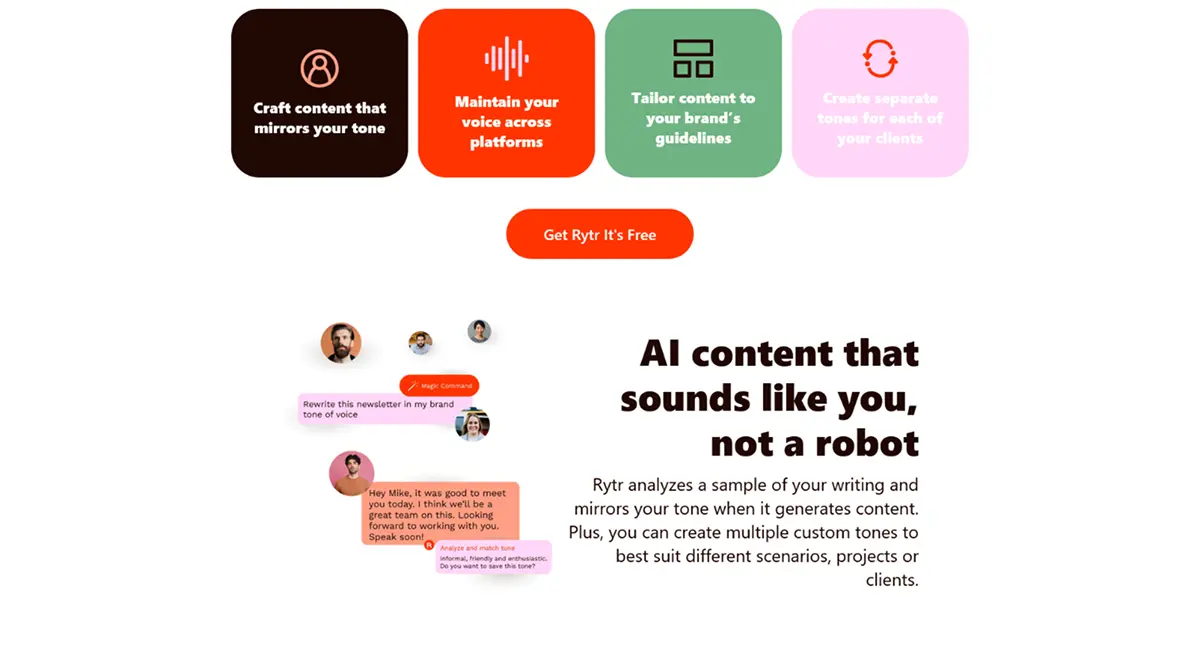
This is available on the Unlimited plan (1 voice profile) and Premium plan (multiple voice profiles). It's one of Rytr's genuinely differentiating features. Most budget AI writers don't offer anything like this.
Chrome extension
Rytr's Chrome extension brings AI writing directly into whatever you're already working in. It works across Gmail, Google Docs, Google Sheets, Asana, WhatsApp, Slack, and essentially any text field in your browser. You can generate, rewrite, expand, or shorten text without leaving the page you're on.
The extension is free to install and works with all plans, including the free tier. This is a legitimate productivity booster. Instead of switching between Rytr's editor and your email client, you write the email directly in Gmail with Rytr assisting in real time.
Plagiarism checker (powered by Copyscape)
Rytr includes a built in plagiarism checker powered by Copyscape, one of the most trusted plagiarism detection services on the web. This is a genuine value add because most budget AI writers either don't include plagiarism checking at all or use inferior in house solutions. On the Unlimited plan you get 50 checks per month, and Premium gives you 100.
API access
For developers and businesses that want to embed Rytr's AI writing capabilities into their own products, Rytr offers API access. Pricing starts at $0.60 per 10,000 characters after a free initial allotment. The API supports all use cases and can generate content in 30+ languages. No coding experience is required to get started, and Rytr provides documentation and code snippets to help you integrate quickly.
20+ tones of voice
Every piece of content you generate can be set to a specific tone. Rytr offers over 20 preset tones including Formal, Casual, Convincing, Friendly, Urgent, Enthusiastic, Humorous, Professional, and more. On the paid plans, you can also create custom tones. The tone selection genuinely affects the output. A "Convincing" product description reads very differently from a "Casual" one, which saves you from having to manually rewrite the personality into AI generated text.
Want to test all these features yourself? Rytr offers a permanent free plan with 10,000 characters per month, no credit card required.
Try Rytr FreeRytr pricing in 2026: what you'll actually pay
Rytr keeps pricing dead simple. Three plans, no hidden fees, no per word charges. The only differences are character limits, tone matching, language support, and plagiarism checks.
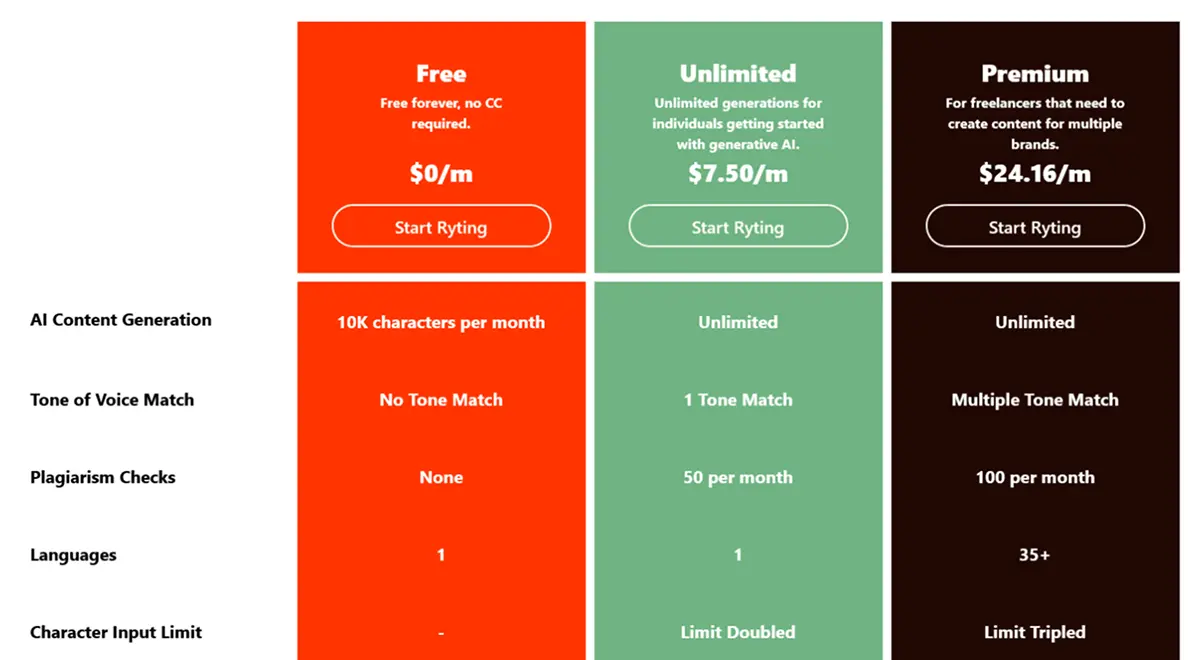
The Free plan at $0/month gives you 10,000 characters per month (roughly 1,500 to 2,000 words). You get access to all 40+ use cases, 20+ tones, the Chrome extension, and the community. No plagiarism checking, no tone matching, and only one language. This is enough to test whether Rytr fits your workflow, but too limited for regular use.
The Unlimited plan at $9/month ($7.50/month billed annually) removes all character limits. You get unlimited AI content generation, 1 tone of voice match, 50 plagiarism checks per month, doubled character input limit, priority support, and access to the Chrome extension with 20+ preset tones. This is the plan most individual users need. At $9/month, it's one of the cheapest unlimited AI writing tools available. Jasper's cheapest plan is $49/month. Copy.ai's paid plan starts at $49/month. Even ChatGPT Plus is $20/month. Rytr at $9 is genuinely unbeatable on price.
The Premium plan at $29/month ($24.16/month billed annually) adds everything from Unlimited plus multiple tone matches, 35+ languages, 100 plagiarism checks, custom use cases, tripled character input limit, and priority support. You can also add team seats at $19/month per person. This plan makes sense for freelancers juggling multiple brands or small agencies that need multilingual content.
Annual billing saves you about 17%, and you essentially get 2 months free. There's no explicit money back guarantee, but the generous free plan makes that less of an issue since you can test everything before paying.
"Rytr enables me to do 3x the amount of work because I have a tool that drafts copy for me in my own voice; all I have to do is edit the details."
— Kate D., G2 ReviewThe free plan: what you actually get
Unlike Jasper and most premium AI writing tools, Rytr offers a permanent free plan that never expires. No credit card required, no trial countdown. You sign up, start generating content, and the free tier stays available forever.
What you get: 10,000 characters per month (about 1,500 to 2,000 words). Access to all 40+ use cases and 20+ tones of voice. The Chrome extension works on the free plan. You also get access to Rytr's community forum. That's genuinely more generous than most competitors offer.
Where it stops: 10,000 characters fills up fast. Write three product descriptions and a couple of emails, and you're probably done for the month. No plagiarism checking, no tone of voice matching, and content generation is limited to one language. The free plan also doesn't include custom use cases.
For context, 10,000 characters is enough to evaluate whether Rytr's output quality matches your needs and whether the template workflow suits how you work. It's not enough to rely on as a daily writing tool. If you find yourself hitting the limit within the first week, the $9/month Unlimited plan is the obvious upgrade.
What real users are saying
We dug through reviews across Trustpilot, G2, Capterra, and AppSumo to understand what happens after the initial excitement wears off.
Rytr holds a 4.5 out of 5 on Trustpilot (2,455 reviews), 4.7 out of 5 on G2 (~800 reviews), and 4.83 out of 5 on AppSumo (1,331 reviews). On G2, 93.67% of reviewers identify as small business users. That tells you exactly who this tool resonates with most.
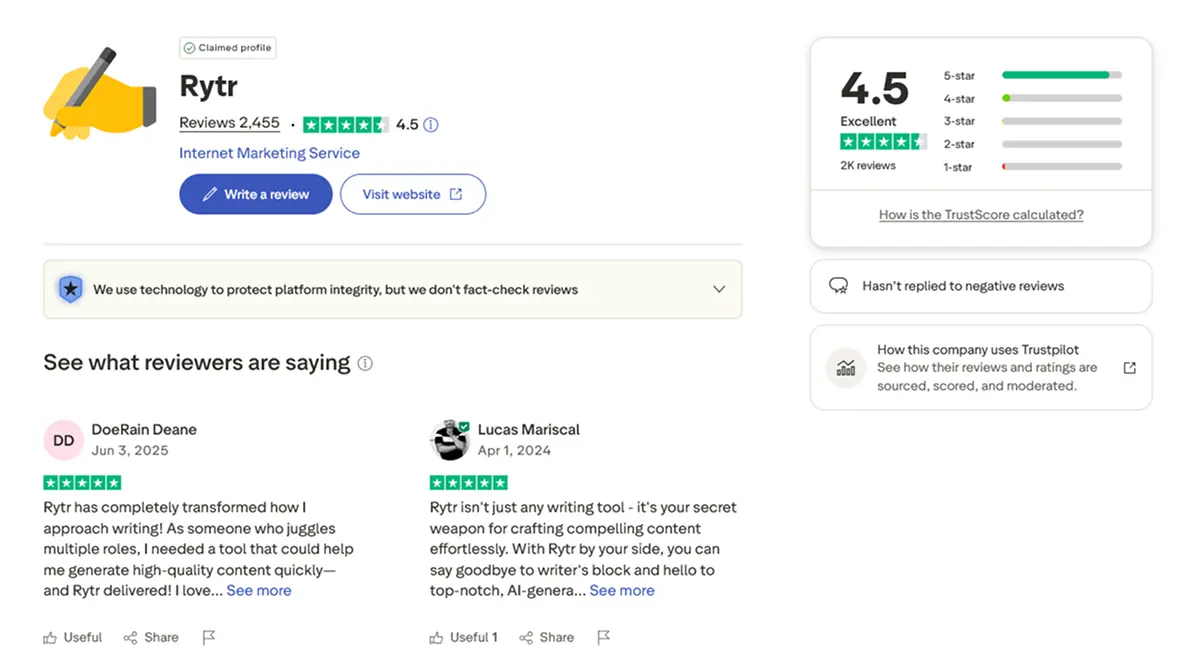
The most praised aspects are speed (most generations take 2 to 5 seconds), ease of use (the template system requires zero learning curve), and value for money (the $9/month unlimited plan is hard to argue with). Multiple reviewers specifically mention the My Voice feature as a genuine differentiator. The Chrome extension also gets regular praise for letting people write AI assisted content directly in Gmail and Google Docs without switching tabs.
The most common complaints center on three things. First, long form content quality is consistently flagged as weak. Blog posts and articles feel stitched together with generic openings and repetitive phrasing. Second, the integration ecosystem is thin. No Zapier connection, no WordPress plugin, no PDF export. If your workflow depends on connecting tools, you'll hit walls quickly. Third, some users report billing frustrations. A few Trustpilot reviews mention being charged after cancellation and difficulty getting refunds. The customer service sub score on Capterra is 4.0 out of 5, the lowest of all their category ratings.
One interesting pattern: users who've tried both Rytr and ChatGPT often describe keeping Rytr specifically for quick, structured tasks (emails, descriptions, captions) while using ChatGPT for anything requiring depth or nuance. That's a smart approach, and it tells you exactly where Rytr's strengths lie.
Honest pros and cons breakdown
What we like
What could be better
Who should use Rytr (and who shouldn't)
Rytr is a strong fit if you are a freelancer, marketer, or small business owner who needs to produce high volumes of short form content quickly and affordably. It's ideal for daily tasks like writing emails, product descriptions, social media posts, ad copy, and review responses. If you've been using ChatGPT for these tasks and find yourself spending too much time crafting prompts, Rytr's template system will save you significant time. And if budget is a primary concern, nothing else on the market matches $9/month for unlimited AI content.
You might prefer a different tool if you need to write long form blog posts or articles that require depth and originality (ChatGPT Plus or Jasper), need native integrations with your existing marketing stack (Copy.ai or Jasper), are a technical writer producing documentation or research content (ChatGPT or Claude), or need advanced collaboration features for a large team (Jasper's Business plan).
"My all time favorite writing assistant! Rytr helps me accomplish all my writing tasks efficiently and in a fraction of the time taken before."
— Amanda H., G2 ReviewHow Rytr stacks up against the competition
The AI writing space is crowded in 2026. Here's how Rytr compares to the tools you're most likely considering.
Rytr vs ChatGPT: This is the comparison everyone makes. ChatGPT is more powerful for long form content, complex reasoning, nuanced writing, and conversational editing. Rytr is faster for structured, repetitive tasks because the templates eliminate prompt engineering. ChatGPT Plus costs $20/month versus Rytr's $9/month. If you primarily write short form marketing content, Rytr saves time and money. If you need flexibility and depth, ChatGPT wins. Many users keep both and use each for what it does best.
Rytr vs Jasper: Jasper is the premium player in AI writing. The Creator plan starts at $49/month, more than five times Rytr's Unlimited plan. Jasper offers deeper brand voice training, marketing campaign workflows, team collaboration, and longer, more coherent blog post generation. If you're a solo freelancer producing short form content on a budget, Rytr delivers 80% of the value at 20% of the price. If you're running a content marketing operation and need polished long form output, Jasper justifies the premium.
Rytr vs Copy.ai: Copy.ai offers a similar template based approach with a free plan and paid plans starting at $49/month. Copy.ai has more advanced workflow automation and native integrations that Rytr lacks. But at $49/month versus $9/month, Rytr is significantly cheaper for comparable core features. If integrations matter to your workflow, Copy.ai is worth the premium. If you just need fast content generation, Rytr is the better value.
Rytr vs Sudowrite: Sudowrite is built specifically for creative and fiction writers, with features like "Describe" and "Brainstorm" that are designed for storytelling. Rytr is built for marketing and business content. They serve completely different audiences. If you're writing novels or screenplays, Sudowrite is the better fit. For everything else, Rytr wins on versatility and price. We have a full Rytr vs Sudowrite comparison if you want the detailed breakdown.
Frequently asked questions
Rytr has three plans. The Free plan gives you 10,000 characters per month at no cost. The Unlimited plan costs $9/month (or $7.50/month billed annually) and removes all character limits with unlimited AI content generation. The Premium plan costs $29/month (or $24.16/month annually) and adds multiple tone matches, 35+ languages, custom use cases, 100 plagiarism checks per month, and priority support. All plans include access to all 40+ use cases and the Chrome extension.
Yes, Rytr is one of the most beginner friendly AI writing tools available in 2026. The interface is simple and template based, so you don't need any prompt engineering skills. You pick a use case, select a tone, enter a brief description, and Rytr generates content in seconds. The free plan lets you test everything without paying, and the Unlimited plan at $9/month is one of the cheapest paid AI writing tools on the market.
They serve different purposes. Rytr is faster for structured short form tasks like emails, product descriptions, social media posts, and ad copy because of its pre built templates and tone controls. ChatGPT is more powerful for long form content, complex reasoning, and conversational editing. For quick daily writing tasks with consistent formatting, Rytr saves more time. For in depth articles or nuanced content, ChatGPT produces better results. Many users keep both tools and use each for what it does best.
Yes, Rytr offers a permanent free plan with 10,000 characters per month, which is roughly 1,500 to 2,000 words. You get access to all 40+ use cases, 20+ tones of voice, and the Chrome extension. The free plan does not include plagiarism checking, tone of voice matching, or multi language support beyond one language. No credit card is required to sign up, and the plan never expires.
Rytr can generate blog outlines, introductions, and individual paragraphs, but it struggles with full length articles. The outputs tend to be short and surface level, so you will need to generate multiple sections separately and then edit them together manually. For quick drafts and first passes, Rytr is useful. For publish ready long form content, you will need significant human editing or a more advanced tool like ChatGPT or Jasper.
Yes, Rytr includes a built in plagiarism checker powered by Copyscape, one of the most trusted plagiarism detection services available. On the free plan, plagiarism checking is not available. The Unlimited plan includes 50 checks per month, and the Premium plan includes 100 checks per month. This is a valuable addition since most budget AI writing tools do not include any plagiarism detection.
On the Free and Unlimited plans, Rytr supports one language. The Premium plan at $29/month (or $24.16/month annually) unlocks support for 35+ languages including Spanish, French, German, Arabic, Chinese, Japanese, Portuguese, and many more. This makes the Premium plan worth considering if you regularly create content for international audiences or multilingual markets.
Final verdict: is Rytr worth it in 2026?
Yes, but with a clear understanding of what it is and what it isn't. Rytr is the best value AI writing tool on the market for short form content. At $9/month for unlimited generation, with 40+ use cases, 20+ tones, a Chrome extension, a plagiarism checker, and a brand voice matching feature, nothing else comes close at this price point. For freelancers, marketers, and small business owners who produce emails, product descriptions, social media posts, and marketing copy daily, Rytr is a genuine time saver that pays for itself almost immediately.
Where Rytr falls short is equally clear. The AI model hasn't kept pace with competitors running GPT-4o and Claude 3.7 Sonnet, which means output quality for complex or nuanced content lags behind. Long form writing is its biggest weakness. Blog posts and articles come out generic and need heavy editing. The lack of integrations with WordPress, Zapier, or any CMS means manual copy paste is unavoidable. And the billing complaints on Trustpilot are worth noting, even if they represent a small percentage of users.
The smartest approach is to use Rytr for what it does best: fast, structured, short form content. Let it handle your emails, descriptions, captions, CTAs, and ad copy. For anything requiring depth, research, or long form coherence, pair it with ChatGPT or a more advanced tool. At $9/month, Rytr doesn't need to do everything. It just needs to do its thing well, and it does.
If you're still deciding, start with the free plan. Generate a few emails, create some product descriptions, test the Chrome extension in Gmail, and you'll know within 20 minutes whether Rytr fits how you work. For most people who need affordable AI writing assistance, it will.
Ready to write faster? Get access to 40+ use cases, 20+ tones, and unlimited AI content generation. Plans start at $9/month with a permanent free plan available.
Get Rytr it's Free